Visitor management system comparison

Fidentity vs Front Desk

A side-by-side view of workflow fit, rollout signals, pricing posture, review evidence, and published product data.

Comparison summary

What is different?

Side-by-side comparison of Fidentity vs Front Desk focused on buyer-fit and deployment factors relevant to VMS purchasing. Comparison highlights where one vendor has documented signals (pricing, features, reviews) and where both lack publicly verifiable details (hardware, regional hosting, workflow depth, integrations).

Evidence confidence: low

Key differences

FactorFidentityFront DeskBuyer meaning
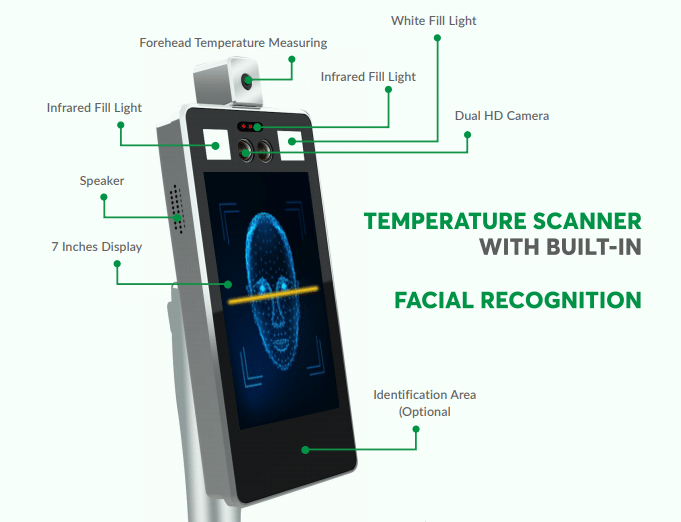
Published feature signalsFidentity lists many high-level features (touchless check-in, mobile/QR registration, facial recognition, e-badges, host notifications, emergency notifications, reporting, multisite, integrations).Front Desk highlights voice-enabled Alexa check-in, Slack notifications, and delivery/multi-location support; fewer published feature describes.Fidentity presents a broader feature set on paper, which may indicate suitability for buyers needing compliance and multisite functionality; Front Desk's voice-first approach may suit lobbies prioritizing contactless kiosk UX and voice interactions.
Pricing postureFidentity shows specific price points mentioned ($9.99, $39.99) but no clear plan mapping or details.Front Desk advertises a free trial but no published pricing.Fidentity's numeric prices give an initial budget signal but lack context (per user/month, per location). Front Desk's free trial may reduce evaluation friction but leaves procurement unable to estimate total cost without vendor engagement.
Customer reviews / social proofFidentity has an aggregated review score (2.9/5) from 2 Trustpilot reviews and a recommendation score listed (84).Front Desk has no published verified review score; recommendation score listed (83) but no source reviews provided.Fidentity's low review average is a caution flag requiring deeper reference checks; Front Desk's lack of published user reviews increases uncertainty about real-world reliability.
Unique interaction modelFidentity emphasizes touchless, mobile/QR and facial recognition workflows (multiple check-in modalities).Front Desk emphasizes voice check-in via Alexa as a primary interaction model.Choose Fidentity when you need variety in contactless check-in options including mobile/biometric; choose Front Desk when a voice-first lobby experience (Alexa) is a priority or differentiator.
Evidence completenessMultiple high-level feature describes but many supporting details (deployments, hardware compatibility, integrations) are not published.describes are narrow and there is limited published documentation across deployment, hardware, integrations, and reviews.Both vendors require direct vendor validation for deployment details; Fidentity provides more describes to validate, increasing due diligence scope.
Review counts and confidenceHas 2 published Trustpilot reviews—small sample but tangible.No verified public review sources provided.Fidentity allows buyers to read some user feedback; Front Desk requires buyers to request references or trial feedback from the vendor.

Choose Fidentity when

  • A vendor that advertises a broad feature set (mobile/QR, facial recognition, e-badges, emergency notifications).
  • You prefer having at least some public pricing points to begin budget planning.
  • Multisite and compliance-oriented messaging as a selection filter.
  • Touchless biometric health screening and integrated delivery handling are priority requirements.
  • Integrated delivery management with recipient notifications and automatic reminders

Choose Front Desk when

  • A voice-first visitor experience (Alexa-powered kiosk) as a distinctive lobby UX.
  • You prefer to trial software first with minimal vendor commitment (free trial available).
  • You have a lightweight, Slack-centric notification workflow and want native Slack notifications.
  • A low-cost, rapid-deploy voice-driven lobby tied to Slack notifications
  • Alexa voice check-in as the primary sign-in method (voice-first experience) -

Fidentity fit considerations

  • Assess hardware compatibility for thermal cameras and assisted kiosks
  • Which existing workplace, identity, messaging, or access systems should this connect with?
  • Which plan structure best matches your number of locations, visitor volume, and rollout timeline?
  • Which privacy, compliance, and record-retention requirements matter most for your organisation?
  • How well does Fidentity match your busiest visitor, contractor, or reception workflow?

Front Desk fit considerations

  • Limited documented data retention on free plan (5 days) and no explicit enterprise security/compliance details on pages provided -
  • Does the organization use Slack and/or want voice-based check-in?
  • Required data retention, export, and security/compliance features for enterprise use
  • Multi-location and customisation needs versus the Plus tier capabilities
  • Which existing workplace, identity, messaging, or access systems should this connect with?

What appears similar

  • Both vendors lack publicly documented details on hardware compatibility/flexibility.
  • Neither vendor publishes clear regional hosting/availability information.
  • Both show 0 signal for deep, specialized VMS workflows or published integration matrices.

Fit questions

  • Which system better matches your busiest visitor, contractor, or reception workflow?
  • Which platform fits your current workplace, identity, messaging, and access-control stack?
  • Which rollout path is easiest for your locations, support model, and budget?
MetricFidentityFront Desk
Recommended score93/10091/100
Ongoing free accessFree trial publishedPublished ongoing free plan
Hardware flexibilityOptional kioskOptional kiosk
Visitor workflow depth0 specialised workflow signals0 specialised workflow signals
Flexible, modular pricingFixed tiersFixed tiers
Customer review sentiment2. 9/5 from 2 published reviewsNo review score listed
Evidence confidencemediummedium
Published evidence9 vendor pages analysed2 vendor pages analysed
Best forFront-desk visitor management, Touchless employee attendance, Delivery/package handling automation, Event guest registration, Multi-site operations requiring reportingReception-light offices wanting hands-free check-in, Teams already using Slack, Organizations wanting quick, low-friction rollout, Small businesses or startups evaluating free or low-cost solutions, Event hosts needing simple visitor tracking at single locations
Comparison positioningFidentity positions as a COVID-era, health-screening centric VMS combining facial biometrics, delivery workflows and common directory/messaging integrations.Front Desk differentiates as a voice-first, Slack-integrated visitor system geared toward quick, self-serve deployment and budget-conscious teams.
Best-fit signalsChoose Fidentity when touchless biometric health screening and integrated delivery handling are priority requirements.Choose Front Desk when you want a low-cost, rapid-deploy voice-driven lobby tied to Slack notifications
Pricing informationSite lists Standard, Premium and Enterprise plans with monthly and annual billing; specific customer pricing requires contacting vendor. Additional kiosk/location add-ons and feature availability vary by tier (.Vendor offers a free always tier plus paid Standard and Plus tiers; Standard listed as $40/month (billed monthly after beta) and Plus is 'Contact Us' for pricing.

Fidentity

fidentity.com

  • Integrated delivery management with recipient notifications and automatic reminders
  • medium confidence
View full profile

Front Desk

www.tryfrontdesk.co

  • Alexa voice check-in as the primary sign-in method (voice-first experience) -
  • Does the organization use Slack and/or want voice-based check-in?
  • medium confidence
View full profile

How to use this comparison

Metrics are calculated consistently from public vendor information, review sources and product data. Data availability varies by vendor, so consider your own security, operational, regional and budget requirements before deciding which system fits.

Compare another pair

Change one system

Both current systems are selected. Choose a different system in either field to open a new comparison.

First system
Second system