Visitor management system comparison

Fidentity vs Navigate360

A side-by-side view of workflow fit, rollout signals, pricing posture, review evidence, and published product data.

Comparison summary

What is different?

Side-by-side comparison focused on buyer-fit and operational differences between Navigate360 and Fidentity for visitor management use cases.

Evidence confidence: medium

Key differences

FactorFidentityNavigate360Buyer meaning
Primary industry focus / buyer fitListed specifically for K-12 schools, workplaces, and healthcare; explicit compliance and school use-case signals.Listed for Enterprise, Compliance, and Workplace but no explicit K‑12 or healthcare signal.Navigate360 may better match buyers in K‑12 and healthcare environments seeking VMS with school-focused features; Fidentity appears targeted at general enterprise/workplace use.
Feature emphasis from descriptionsDescription highlights screening, custodial/block-list checks, badge printing, check-in/out, and real-time occupancy visibility.Description highlights touchless check-in, mobile/QR registration, facial recognition, e-badges, photo capture, host and emergency notifications, and multisite management.Navigate360 emphasizes safety/compliance workflows and occupancy tracking; Fidentity emphasizes contactless entry, identity capture, and notifications — buyers prioritizing touchless biometrics or events may prefer Fidentity.
Reported review scores and volume5.0 average from 37 reviews (GetApp/G2 aggregated sources).2.9 average from 2 reviews (Trustpilot).Navigate360 shows stronger and broader positive review signal; Fidentity has limited/negative review evidence which raises caution for social proof–sensitive buyers.
Pricing posture (published figures)Multiple high-dollar figures listed ($15,245; $8,000; $7,245) suggesting enterprise-priced packages or annual contracts.Lower per-user or tier-style numbers shown ($9.99; $39.99) suggesting lower-entry or per-seat pricing.Buyers with constrained budgets or seeking per-seat SaaS pricing may prefer Fidentity; buyers looking for enterprise deployments or bundled services should budget toward Navigate360’s higher listed prices.
Multisite and enterprise managementDescription mentions real-time occupancy and deployments across schools/workplaces—implies multi-site monitoring but no explicit multisite management term.Explicitly lists multisite management in feature set.Fidentity explicitly positions for multisite enterprises; Navigate360 likely supports larger organizations but documentation for multisite administration is not explicit.
Biometric & touchless capabilitiesNo biometric/facial recognition mentioned in the provided description.Facial recognition, mobile/QR, and touchless check-in explicitly called out.Organizations requiring facial biometrics or fully touchless visitor flows are more likely to find those capabilities in Fidentity per available descriptions.
Emergency/evacuation and notificationsReal-time occupancy visibility noted but emergency/evacuation workflows not explicitly described.Emergency notifications and host notifications explicitly noted.Fidentity shows clearer messaging around notifications and emergency alerts; Navigate360 provides occupancy data which could support evacuation but lacks explicit notification workflow detail in the provided text.
Contractor / vendor management and eventsVolunteer management and visitor screening mentioned; event management not called out.Event management explicitly included; also handles deliveries and employees in addition to visitors.Fidentity’s description suggests broader handling of events, deliveries, and contractor-like flows; Navigate360 notes volunteers which may suit schools and nonprofits.

Choose Fidentity when

  • You are a K‑12 district or healthcare organization seeking school/healthcare-aligned workflows (screening, volunteers, custodial/block-list checks).
  • You prioritize strong, broad customer review evidence and references.
  • Occupancy visibility to support compliance or facility monitoring.
  • Touchless biometric health screening and integrated delivery handling are priority requirements.
  • Integrated delivery management with recipient notifications and automatic reminders

Choose Navigate360 when

  • Explicit touchless, facial-recognition, mobile/QR entry or event/multisite management as core requirements.
  • Lower entry price points or per-seat pricing options for smaller sites or pilots.
  • Built-in emergency notification workflows and host alerting out of the box.
  • A visitor system tightly coupled to emergency preparedness and reunification (Campus360 customers).
  • Choose if you are a K–12 district seeking consolidated safety tooling and volunteer lifecycle management.

Fidentity fit considerations

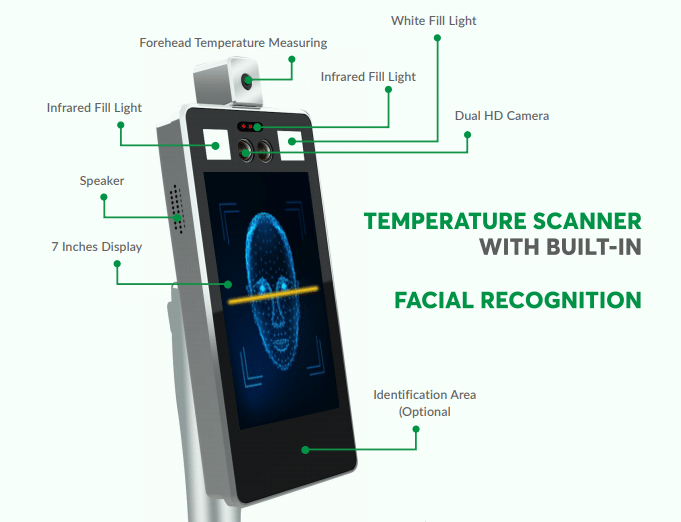
  • Assess hardware compatibility for thermal cameras and assisted kiosks
  • Which existing workplace, identity, messaging, or access systems should this connect with?
  • Which plan structure best matches your number of locations, visitor volume, and rollout timeline?
  • Which privacy, compliance, and record-retention requirements matter most for your organisation?
  • How well does Fidentity match your busiest visitor, contractor, or reception workflow?

Navigate360 fit considerations

  • Security posture and certifications (e. g.
  • Depth of emergency-integration (roll call, responder maps, 911 alerts)
  • SIS and background-check integration details and costs
  • Hosting, data residency, and security certifications
  • Hardware bundle options and kiosk support

What appears similar

  • Both descriptions are cloud-based VMS solutions focused on workplace and compliance use cases.
  • Neither product profile in the provided data publishes hardware compatibility lists, regional hosting, or detailed deployment/integration options.
  • Both include visitor photo capture or photo/badge capabilities (Navigate360: badge printing; Fidentity: photo capture and e‑badges).

Fit questions

  • Which system better matches your busiest visitor, contractor, or reception workflow?
  • Which platform fits your current workplace, identity, messaging, and access-control stack?
  • Which rollout path is easiest for your locations, support model, and budget?
MetricFidentityNavigate360
Recommended score93/10093/100
Mobile platform coverageiOS and AndroidiOS and Android
Hardware flexibilityOptional kioskOptional kiosk
Visitor workflow depth0 specialised workflow signals0 specialised workflow signals
Customer review sentiment2. 9/5 from 2 published reviews5. 0/5 from 37 published reviews
Evidence confidencemediummedium
Published evidence9 vendor pages analysed9 vendor pages analysed
Best forFront-desk visitor management, Touchless employee attendance, Delivery/package handling automation, Event guest registration, Multi-site operations requiring reportingK-12 front office and district safety teams, School operations leaders seeking consolidated safety tools, Districts adopting Alyssa’s Law panic/alerting, Administrators needing volunteer/visitor screening, IT teams needing browser-based, device-flexible check-in
Comparison positioningFidentity positions as a COVID-era, health-screening centric VMS combining facial biometrics, delivery workflows and common directory/messaging integrations.Navigate360 positions visitor management inside an integrated Campus360 safety ecosystem focused on K–12 districts that need combined visitor screening, emergency response, and reporting.
Best-fit signalsChoose Fidentity when touchless biometric health screening and integrated delivery handling are priority requirements.Choose Navigate360 when you need a visitor system tightly coupled to emergency preparedness and reunification (Campus360 customers)., Choose if you are a K–12 district seeking consolidated safety tooling and volunteer lifecycle management.
Pricing informationSite lists Standard, Premium and Enterprise plans with monthly and annual billing; specific customer pricing requires contacting vendor. Additional kiosk/location add-ons and feature availability vary by tier (.Pricing mentions $15,245, $8,000, $7,245

Fidentity

fidentity.com

  • Integrated delivery management with recipient notifications and automatic reminders
  • medium confidence
View full profile

Navigate360

navigate360.com

  • Tight integration with emergency management, roll call, and reunification workflows (Campus360) [
  • Depth of emergency-integration (roll call, responder maps, 911 alerts)
  • medium confidence
View full profile

How to use this comparison

Metrics are calculated consistently from public vendor information, review sources and product data. Data availability varies by vendor, so consider your own security, operational, regional and budget requirements before deciding which system fits.

Compare another pair

Change one system

Both current systems are selected. Choose a different system in either field to open a new comparison.

First system
Second system