

What does a visitor management system actually do?
A visitor management system is software for recording and coordinating workplace visits: collecting visitor details, recording arrival and departure, and connecting those records with reception tasks. For example, Envoy documents visit entries containing sign-in and sign-out times, photographs and signed documents; FacilityOS describes invitations, badges and host notifications within its visitor workflow. These are documented product examples, not a guarantee that every system includes every function. Envoy sign-in documentation; FacilityOS VisitorOS.
For your decision, start with a narrower question: Which part of a visit can your team no longer handle reliably? Perhaps reception repeatedly chases hosts, departure records remain unresolved, or retrieving a past visit takes too much effort. Treat these as problems to investigate—not automatic reasons to buy software.
Our recommendation: map an arrival through to its confirmed departure before choosing between a better paper procedure and a digital system.
Visitor management, booking and access control: different jobs
Separate the decision into these responsibilities:
| Responsibility | Evidence-backed scope | Question to ask at your office |
|---|---|---|
| Appointment booking | Microsoft Bookings provides a scheduling calendar, Outlook synchronization and appointment notifications. Microsoft service description | Do we mainly need people to select an available appointment time? |
| Visitor management | Envoy documents arrival records, host details, sign-out times and searchable visitor logs. Envoy visitor-log documentation | Do we need to coordinate and record what happens when guests actually attend? |
| Access control | NIST defines access control to include granting or denying requests to enter physical facilities. NIST glossary | Who or what decides whether this person may enter a particular area? |
These responsibilities can overlap within a product: Teamgo lists appointment scheduling alongside visitor invitations, while Envoy lists access-control integrations. Teamgo features; Envoy product overview.
Recommended boundary: do not accept a calendar invitation, completed sign-in form or printed badge as sufficient evidence that a door permission has been granted. Ask for a demonstration of the specific approval and door-access behavior you need. If your only problem is appointment availability, investigate booking first; if it is restricted-door entry, involve the access-control owner first.
A worked office visit: invitation to confirmed departure
Hypothetical office visit: Maya, a design consultant, is meeting employee Daniel at 10:00. Priya staffs reception. The office requires visitors to wait for their host and remain escorted. Maya will not receive a door credential. The people, times, rules and ownership below are illustrative recommendations—not a description of a particular product configuration.
| Stage | What happens in this example | Accountable owner | Record or handoff to confirm |
|---|---|---|---|
| Before arrival | Daniel enters Maya's expected visit and sends reception instructions. | Daniel, the host | Expected guest, visit date, host and purpose |
| Arrival at 09:50 | Maya signs in; Priya assists if she cannot use the device and resolves any mismatch with the invitation. | Priya, reception | Actual arrival, linked to the correct visit |
| Review and host contact | Priya checks the office's required acknowledgement and contacts Daniel. If he does not respond, she calls his nominated delegate while Maya waits. | Priya until a host accepts the handoff | Required step completed; host or delegate contacted |
| Badge and welcome | Priya issues a visible visitor badge. Daniel meets Maya and escorts her to the meeting. | Priya for the badge; Daniel for the escort | Badge issued and host handoff completed |
| During the visit | Daniel remains responsible for Maya. Reception refers to the active visitor record if a question arises. | Daniel for the guest; Priya for the record | Visit remains open until departure is confirmed |
| Departure at 11:15 | Daniel brings Maya back to reception. Maya signs out and returns the badge; Priya checks that the visit is closed. | Priya, supported by Daniel | Actual departure recorded; badge returned |
| After departure | The facilities manager reviews unresolved visits and applies the office's approved record-handling policy. | Facilities manager | Exceptions resolved and records handled under that policy |
The software building blocks are documented: FacilityOS lists pre-registration, acknowledgements, badge printing and host notifications; Envoy documents visit entries, active-visitor filtering and sign-out. The ownership and escalation choices above are ours. FacilityOS VisitorOS; Envoy sign-in; Envoy visitor log; Envoy sign-out.
Use this example as a working sheet: replace each person with an actual role at your site. If you cannot name an owner for a handoff, settle that responsibility before configuring software.
- 1. Invite — hostExpectedHypothetical owner: Daniel sends Maya's invitation. Capability basis: FacilityOS documents visitor pre-registration. FacilityOS
- 2. Record arrival — receptionArrivedHypothetical owner: Priya helps Maya complete sign-in. Capability basis: Envoy documents creating a visit entry at sign-in. Envoy
- 3. Review and notify — receptionHost contactedHypothetical owner: Priya checks the required acknowledgement and contacts Daniel. Capability basis: FacilityOS lists policy acknowledgements and host notifications. FacilityOS
- 4. Welcome and escort — reception to hostHandoff confirmedHypothetical owners: Priya issues a badge; Daniel collects Maya. Badge capability is documented by FacilityOS; the escort rule is an illustrative office policy. FacilityOS
- 5. Maintain the active record — host and receptionVisit openHypothetical owners: Daniel remains with Maya; Priya manages the record. Capability basis: Envoy supports filtering for currently signed-in visitors. Envoy
- 6. Close the visit — receptionDeparture confirmedHypothetical owner: Priya confirms Maya's departure and badge return. Capability basis: Envoy documents visitor self-sign-out and manual dashboard sign-out. Envoy
Test the handoffs—not just the sign-in screen
Pay particular attention to what a recorded status actually means.
An arrival notification needs a follow-up procedure. Envoy's visitor log can display notification status and explain why some notifications were not sent. Envoy visitor-log documentation. In Maya's hypothetical visit, require Priya to confirm that Daniel or his delegate has accepted responsibility, rather than ending the handoff when an alert is sent.
A manual entry may omit steps. Envoy states that creating a new entry directly from its dashboard does not let the visitor sign documents or have a photograph taken during that entry process. Envoy sign-in documentation. When testing receptionist-assisted sign-in, check whether it completes your required steps or merely creates a record.
An automatic sign-out is time-based. Envoy allows administrators to configure a time at which remaining visitors are signed out automatically. Envoy sign-out documentation. Our recommendation: do not treat that scheduled timestamp as an observed departure. If Maya leaves without signing out, contact Daniel and resolve the exception explicitly.
An approval label deserves inspection. Envoy documents that its entry status defaults to approved unless a required sign-in field has an associated rule. Envoy visitor-log documentation. Ask what produces each status before relying on it in your reception procedure.
When is a paper visitor process still sufficient?
Editorial decision checklist: use the following as an operational test, not a legal compliance test or a universal visitor-volume threshold.
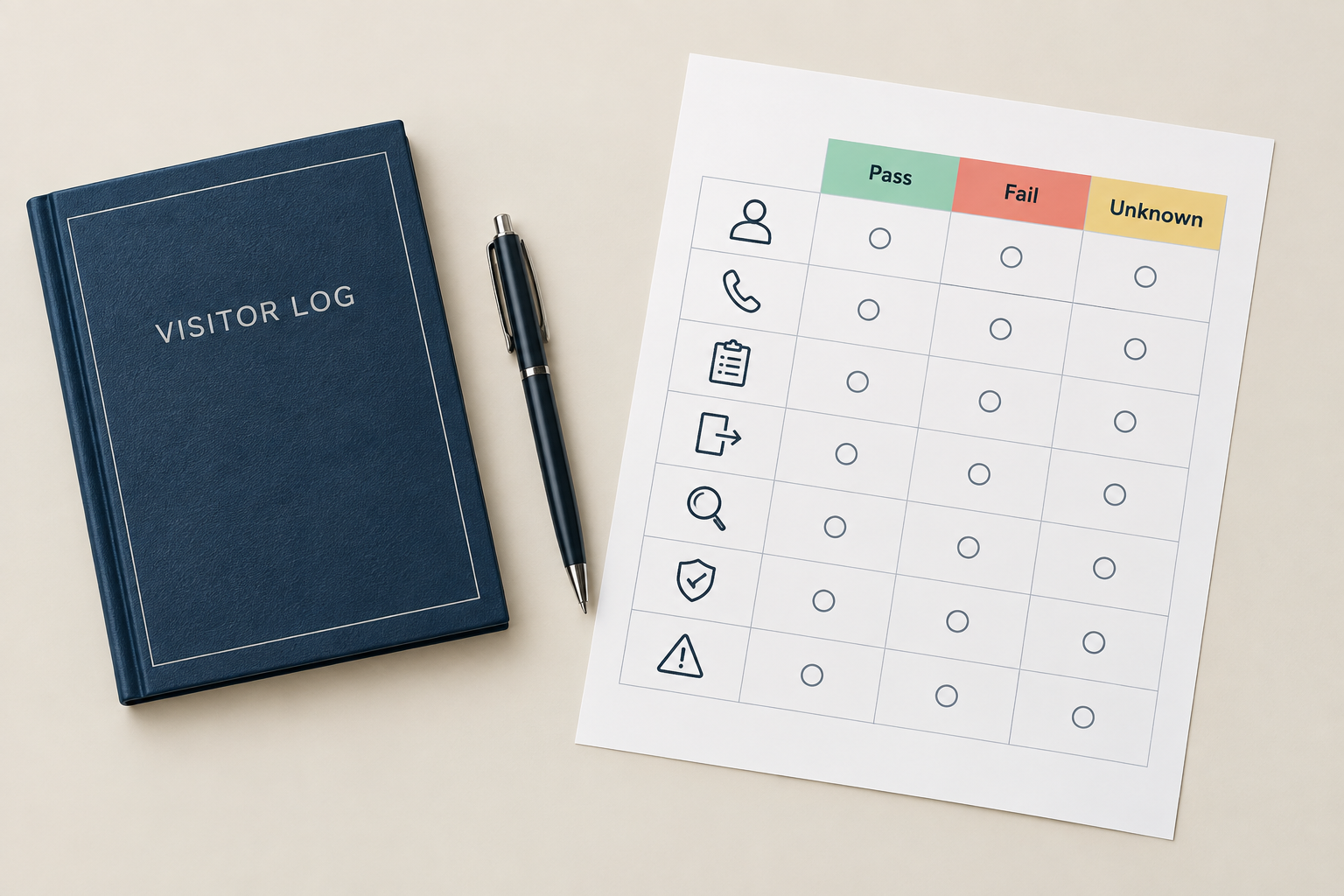
Consider retaining paper if you can demonstrate all of these under your normal operating conditions:
- Arrival coverage: someone consistently receives visitors and records the information your site requires.
- Host handoff: reception can reach the host or a delegate without repeatedly abandoning other duties.
- Current-visitor check: the team can identify unresolved visits and verify whether those guests have left.
- Departure ownership: someone checks sign-outs instead of leaving unfinished entries indefinitely.
- Record retrieval: authorized staff can find the required past visit within your internally agreed response time.
- Information handling: your designated owner accepts the collection, viewing, storage and disposal procedure.
- Exceptions: you have a workable response for an unexpected guest, absent host and visitor needing assistance.
For each item, record pass, fail or unknown, with an example from actual reception work. Do not turn an unknown into a pass because the lobby is usually quiet.
Our recommendation is to keep paper when it passes these tests and no site requirement calls for a different process. Fix ownership first when failures are primarily procedural. Investigate digital sign-in when failures persist and you can identify a specific workflow to test—such as host notification, unresolved-departure review or record retrieval.
Your site's legal obligations and the acceptability of its existing paper process are unknown here. Ask the responsible internal owner to establish those requirements before making the decision.
Turn the problem into a practical next step
If you decide to investigate software, write a short problem statement rather than a feature wish list. For example:
Hypothetical requirement: Reception must link Maya's arrival to Daniel, complete the required acknowledgement, confirm a host handoff and record her departure. An absent host must leave a clear next action for reception.
Then assign these responsibilities before a pilot:
- Facilities: owns the visitor procedure and unresolved-visit review.
- Reception: owns assisted arrival, escalation and departure confirmation.
- Hosts: own guest collection and the return-to-reception handoff.
- IT and the access-control owner: verify the proposed device, notification and door-system arrangements.
- The designated information owner: approves fields, record access, retention and disposal.
These are recommended assignments; adapt them to your staffing model. Include a staffed alternative and an outage procedure in the pilot brief.
Unknown until verified: the selected product's offline behavior, your exact integration behavior, suitable retention settings and whether the proposed deployment meets your site's requirements. Request demonstrations and written answers rather than assuming a feature name settles the issue.
Once the problem and owners are clear, use How to Compare Visitor Management Systems: A Buyer’s Guide for the next decision. Bring your completed visit map and paper-process checklist into that comparison.
Conclusion
Choose the next step by the failure you need to fix. Keep paper if it passes your operational checks and your responsible owners accept it. Clarify responsibilities where handoffs are missing. Investigate a visitor management system when you can name the arrival-to-departure task it must improve—and demonstrate that improvement in your own reception workflow.
Sources
Source pages checked 21 September 2026.