
At a glance
| System | Access | Pricing | Scope | Best fit | Limitation |
|---|---|---|---|---|---|
| Envoy Source | Ongoing free plan | Ongoing free Basic: 100 entries/month, one location, 50 directory employees. Premium is per location/month, billed annually; Enterprise is quoted. | Host alerts; Premium adds badges, photos, documents and directory integrations. | Offices needing enterprise identity integration. | Access-control integrations require Enterprise. Confirm total deployment price and currency. Plans |
| Sign In App | Free trial | Core: GBP £415 per site/year, unlimited sign-ins, employees and connected iPads; 15-day trial. Education bundle available. | Contactless sign-in, approvals, companion app and evacuation reports. | Offices or education procurement. | Different postcodes require separate subscriptions; SSO and SCIM require Pro. Confirm Australian pricing and taxes. Plans |
| Sine | Free trial | Quoted Core tiers based on estimated check-in volume; 30-day trial. | Configurable check-in requirements, geofencing and mobile roll calls. | Mixed visitor/contractor arrivals. | Workflows requires Core; access control is a paid Large-plan add-on. Count staff and contractor check-ins when sizing. Plans |
| Teamgo Source | Free trial | Per physical location, monthly or annual; unlimited visitors; 30-day trial. Subscription amount unconfirmed. | Tablet, QR and browser sign-in, badges and central multi-site management. Features | Workplaces using varied devices. | Features vary by plan/module. Confirm whether required identity, safeguarding and contractor functions are included. Pricing |
| Lobbytrack Source | Ongoing free plan | Ongoing free Starter: up to 100 visitors/month. Paid Basic and Professional are per location/month; Ultimate quoted. Currency unconfirmed. | QR sign-in, photos, badges and Android, iOS and Windows apps. | Receptions using varied devices. | Ultimate feature testing applies only in months below 20 visits—not throughout Starter’s larger allowance. Plans |
| Greetly Source | Paid | Paid Essential and Pro, billed annually; currency and location allowance need confirmation. Plans | Essential includes multichannel alerts, documents and evacuation assistance. | Offices prioritising host communication. | Badges and multi-kiosk support require Pro. Trials apply to some accounts; eligibility and duration are unconfirmed. Terms, 27 October 2025 |
| FacilityOS VisitorOS | Paid | Paid Corporate/Enhanced tiers show monthly starting rates; Enterprise quoted. Currency, commitment and trial availability are unconfirmed. | Corporate includes a managed iPad, setup, hardware support, SSO and reporting. | Hardware-inclusive deployment. | Corporate treats pre-registration, touchless sign-in and badges as add-ons. Confirm equipment and integration scope. Plans |
| VisitUs Source | Ongoing free plan | Ongoing free Core with unlimited sign-ins; paid modules per month/location, each with a seven-day trial. Module amounts unconfirmed. | Core includes digital logs, host-app alerts and multi-location administration. Modules | Modular purchasing. | Email/Teams/SMS alerts, badges, evacuations and integrations require separate modules. Quote the required combination. Pricing |
| Vizito Source | Free trial | Per location, monthly or annual; 14-day trial. Standard allows 100 registrations/month, Pro 300, Enterprise unlimited. Currency needs confirmation. | Pre-registration, badges, agreements and evacuation overview. | Offices with predictable arrival volumes. | Repeat visits count again. Enterprise adds SAML and directory sync; sustained overuse can trigger an upgrade. Plans |
Choose the workflow before the subscription
Shortlist visitor management systems by your required workflow, then compare the complete configuration—not the entry-level subscription alone. These nine options offer different features and purchasing models; none is a universal winner. Prioritise arrival handling, integrations, data controls and total cost.
This is a researched shortlist, not hands-on testing. Plan information is dated 20 October 2026. Suggested fits are our recommendations; features and commercial terms are vendor-documented. Numerical prices are omitted where currency or billing details are unclear.
For software requirements and demonstrations, use the visitor management software buying checklist.
Read the commercial boundaries before shortlisting
The comparison above separates ongoing free access, time-limited trials and paid subscriptions. A trial can expose features that are absent from the plan you eventually buy: compare the required production configuration and obtain written confirmation of every paid dependency. The suggested use cases are editorial recommendations, not proof that a product will pass your site-specific requirements.
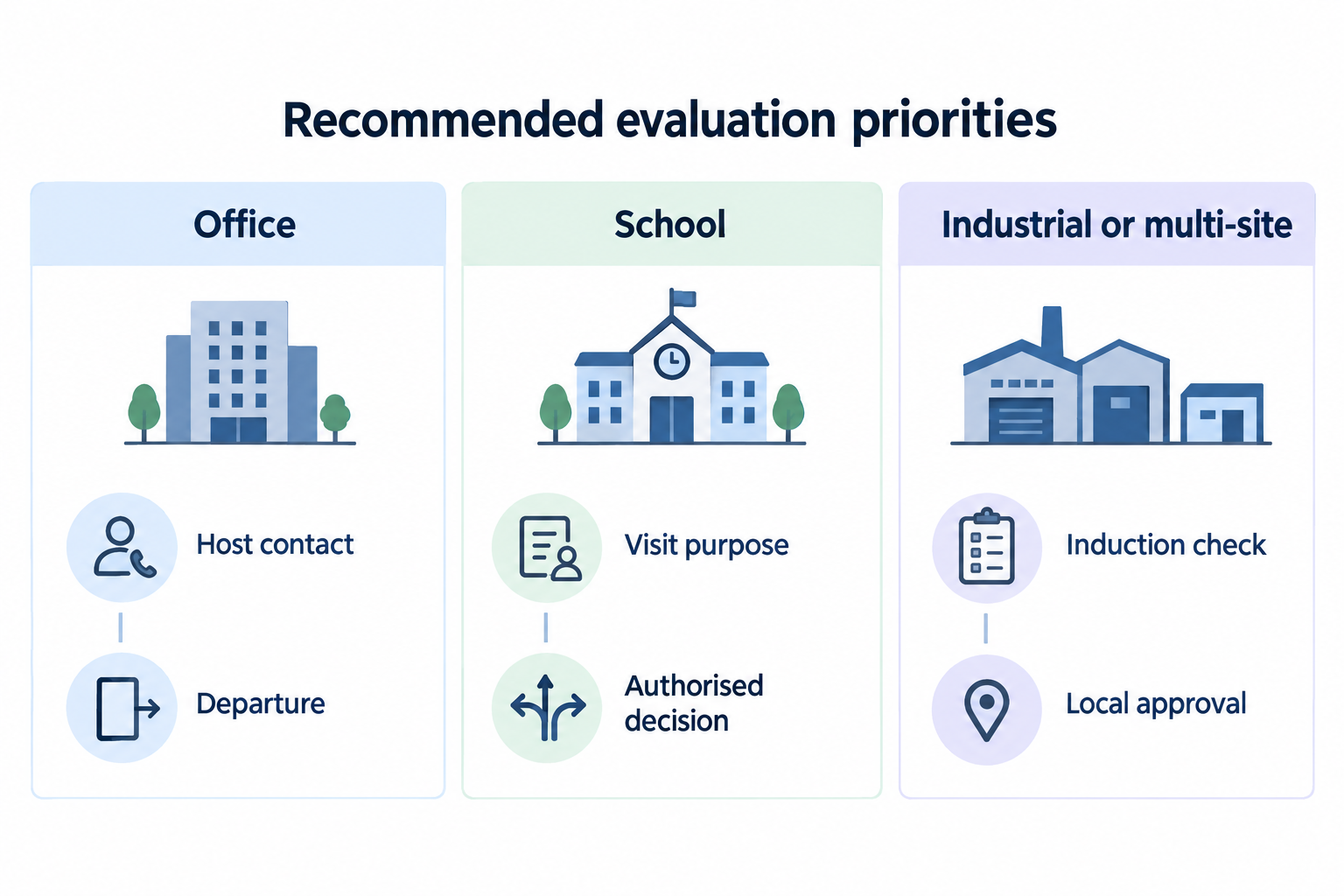
Filter by office, school or industrial need
Recommended shortlist filters:
- Offices: prioritise host reachability, assisted arrivals, directory maintenance and departure reminders. Test unattended reception separately; use the office sign-in and rollout guide to assign responsibilities.
- Schools: require demonstrations of guardian meetings, student collection, contractors and unresolved approvals. Do not treat a badge or screening result as a student-release decision. Adapt the school evaluation checklist to local policy.
- Multi-site or industrial sites: test central configuration alongside local permissions, induction expiry, gatehouse handoffs and access removal. Keep entry approval separate from permission to work; see the contractor exception procedure.
Treat suitability as unresolved until the quoted configuration passes your scenarios—not as established by an industry logo or marketing claim.
Agree your visitor management process before changing tools.
Check the complete cost and data lifecycle
Recommended quote checklist: give every supplier the same site count, entrances, expected arrivals and required functions. Request an AUD total with GST treatment, billing term, renewal conditions and cancellation deadline.
Include tablets, stands, printers, labels, device management, installation, messaging allowances, integrations, onboarding, support and exit/export work. Separate supplier charges from internal administration time. Ask which features disappear after a trial and which costs increase with another location or repeated contractor visits.
For privacy, the OAIC’s 3 October 2025 guidance says APP entities must take reasonable steps in the circumstances to protect personal information. They must also take reasonable steps in the circumstances to destroy or de-identify information no longer needed for any purpose permitted under the APPs. The disposal requirement excludes Commonwealth records and information that Australian law or a court/tribunal order requires them to retain. APP 11 guidance
Our recommendation: make permissions, hosting arrangements, retention and usable exports acceptance conditions, not optional scoring bonuses.
For ownership, integrations and rollout, follow the visitor management solution implementation guide.
- Collect Before collection Consider whether each visitor detail should be collected at all, alongside how it will be protected throughout its lifecycle.
- Protect While held Reasonable protective steps include technical and organisational measures, such as access controls, procedures and staff training.
- Retire When no permitted purpose remains APP entities must take reasonable steps in the circumstances to destroy or de-identify the information, except for Commonwealth records or legally required retention under Australian law or a court/tribunal order.
Sources: Source 1
Run the same pilot before signing
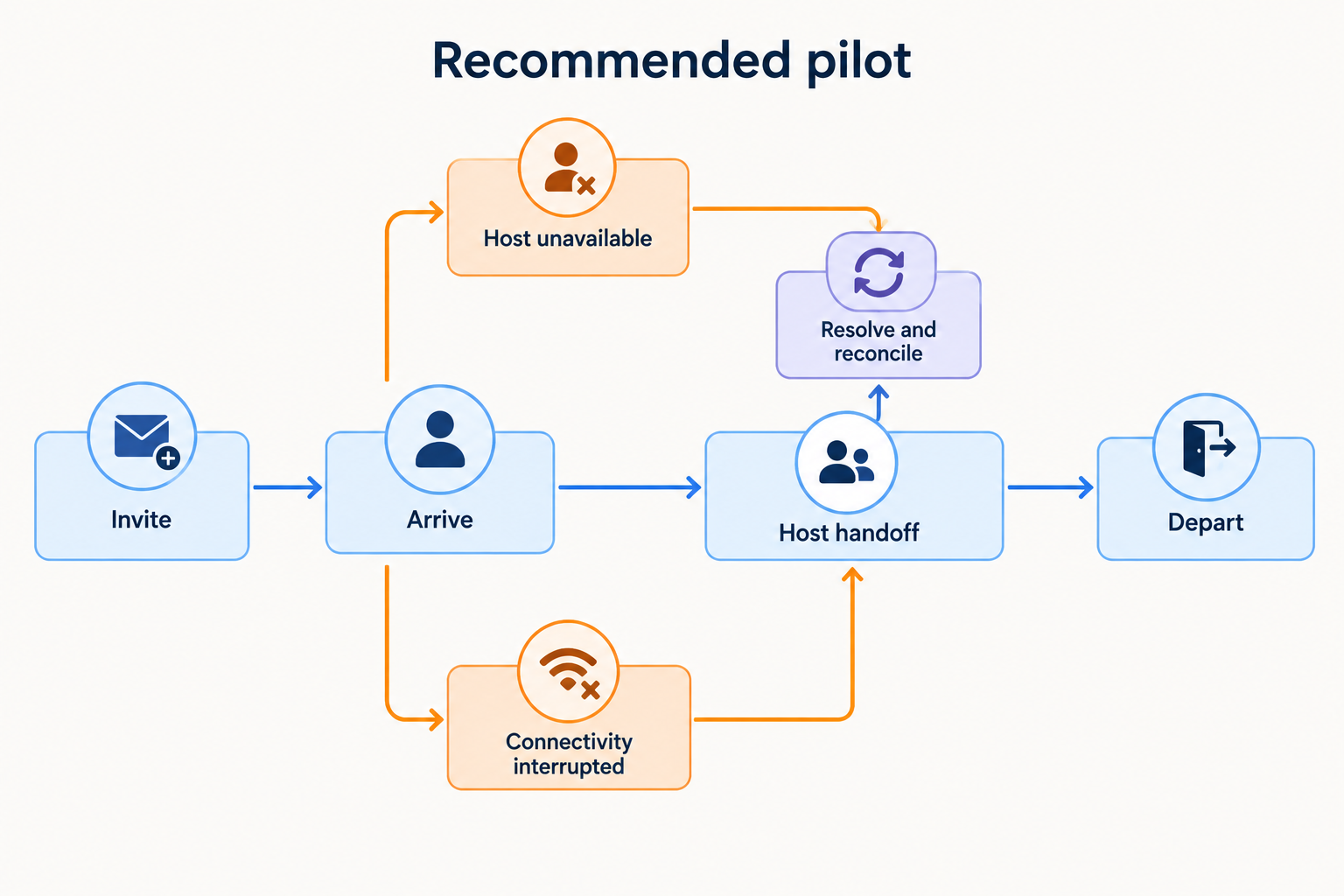
Recommended shared pilot: use fictional visitor details and the plan, devices and integrations you intend to purchase.
- Invite an expected guest; complete check-in, host contact and departure.
- Present a walk-in with an unavailable host and an unanswered required check.
- Test assisted arrival, a returning contractor and a busy group arrival.
- Interrupt connectivity; demonstrate the approved fallback and recovery reconciliation.
- Reconcile a drill roster, remove access where applicable, then export and delete a test record.
Record each outcome as demonstrated, workaround, failed or unknown, including staff effort and paid dependencies. Use the comparison scorecard for a fuller assessment.
Conclusion
Before signing, resolve mandatory failures and unknowns, and confirm that the quote covers the demonstrated configuration, support and accepted limitations.
Sources
Source pages checked 20 October 2026.
Pricing and plan details can change; verify current terms with the vendor.