
Genea Security
www.getgenea.com
- Last scraped (UTC)
- 8 Oct 2026
- Product analysis updated
- 1 Nov 2026
- Sources
- 8
- Evidence confidence
- High
Product media
Directory editorial analysis
What to know about Genea Security
Genea is positioned as a cloud-first access control and visitor management platform suited to organizations that require multi‑site, mobile-first credentialing and integrated video/access workflows. Its strengths include native visitor pre-registration, Apple/Google Wallet mobile keys, interactive floor plans and a broad set of VMS and identity integrations. Genea emphasizes compatibility with non‑proprietary hardware and offers vendor‑assisted deployments via certified integrators and an onboarding team.
- Best for
- Enterprises or real estate/property teams needing cloud centralization and mobile credentialing
- Known strength
- Intuitive, easy-to-administer interface — Review summaries describe the platform as simple to learn, navigate, and manage.
Strengths
- Intuitive, easy-to-administer interface — Review summaries describe the platform as simple to learn, navigate, and manage.
- Remote access management — Customers value managing doors and access across multiple sites remotely.
- Mobile credentials and phone-based unlocking — Review summaries say employees can use smartphones instead of physical keycards.
- Hardware and camera integrations — Customers appreciate connecting hardware and monitoring systems, including Meraki cameras.
- Responsive customer support — Review summaries describe support as quick, helpful, and consistently available.
Fit considerations
- Occasional mobile-access reliability problems — Some reviewers report glitches, slow connectivity, or inconsistent phone unlocking.
- Mobile access may depend on keeping the phone or app active — A reviewer reports access may not work unless the phone application is open.
- Custom card-format management and migration limitations — Review summaries report difficulty managing card formats and extra work when migrating them.
- Limited advanced configuration and reporting — Some reviewers want more advanced controls, reporting, and hardware-overview options.
- Complex schedule and holiday setup — Some users find configuring holidays and special schedules difficult.
Questions to ask
- How well does Genea Security match your busiest visitor, contractor, or reception workflow?
- Which locations, teams, and visitor types should be included in the first rollout?
- What reporting, notifications, and emergency workflows matter most for your sites?
Implementation notes
- Project rollouts typically involve certified dealers/integrators and Genea’s onboarding team to coordinate equipment ordering, installation and testing
Scoring criteria
How Genea Security scores
Scores follow an editorial model benchmarked against VisitUs, which has fixed category and overall scores. Other products are calculated from their captured data. Public scores are intended as comparison prompts alongside your own procurement needs.
Customer review sentiment
4. 5/5 from 121 published reviews across 4 sources, with 155 stored feedback themes
18 point weighting · 121 reviews across review sourcesVisitor and contractor workflows
5 visitor, contractor, badge, host, delivery, identity, and QR workflow signals
10 point weighting · Published vendor and profile signalsEvacuation management
1 evacuation, mustering, roll-call, occupancy, or emergency signal
7 point weighting · Published vendor and profile signalsAdvanced reporting
3 reporting, analytics, audit, export, or visitor-history signals
7 point weighting · Published vendor and profile signalsPublished feature breadth
8 documented capabilities
10 point weighting · Published vendor and profile signalsMobile and kiosk flexibility
iOS and Android; Optional kiosk
8 point weighting · Published vendor and profile signalsOngoing free access
No public evidence captured yet
6 point weighting · Published vendor and profile signalsDeployment and integrations
6 published deployment and integration options
7 point weighting · Published vendor and profile signalsIndustry coverage
12 documented sectors
5 point weighting · Published vendor and profile signalsSource coverage
8 vendor pages analysed, 4 review sources captured
5 point weighting · 8 source pages analysedVisitor management focus
80% fit against visitor-management-specific positioning signals
5 point weighting · Published vendor and profile signalsAccess-control integrations
1 access-control integration signal
5 point weighting · Published vendor and profile signalsRegional hosting and data residency
No public evidence captured yet
3 point weighting · Published vendor and profile signalsPricing transparency
1 published pricing plan
4 point weighting · Published vendor and profile signalsA lower score can mean the directory found less public evidence, not that a product cannot support the workflow. Use these criteria as shortlist prompts alongside your own procurement needs.
Overview
Genea Security is a cloud-native access control and visitor management platform that combines mobile credentialing, interactive floor plans, video integrations and native touchless visitor workflows. It supports mobile keys (Apple Wallet, Google Wallet), BLE/NFC readers, centralized multi-site administration and emergency lockdown/door-exemption planning.
The platform emphasizes non‑proprietary hardware compatibility, API integrations with identity and video systems, and a unified dashboard for access events, visitor logs and custom reporting. Genea highlights 24/7/365 customer support and an onboarding network of certified dealers to assist deployment.
Best for
- Enterprises needing centralized cloud access control
- Building/property management teams consolidating multi‑site security
- Organizations replacing keycards with mobile credentials
- Security teams requiring integrated video + access workflows
- Teams that want native visitor pre-registration and touchless check-in
Target industries
Key capabilities
Custom reporting & export
Generate recurring access audits, hardware status reports and export visitor/access logs (CSV).
Interactive floor plans
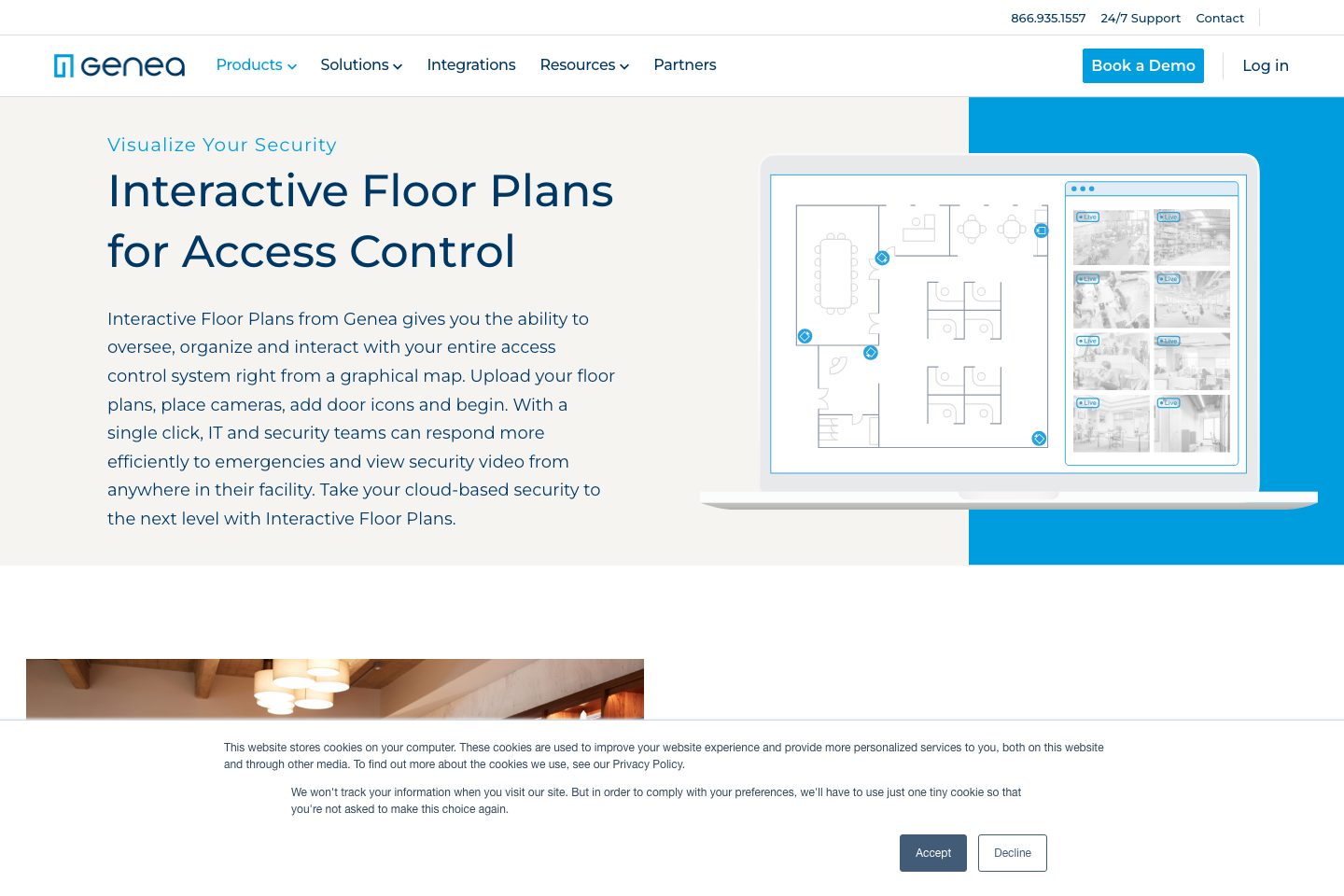
Graphical maps to place doors/cameras, view events and quick-grant access from a pop‑out menu.
Mobile credentials (Apple Wallet/Google Wallet)
Issue mobile keys that can be added to Apple Wallet or Google Wallet for phone/watch-based entry.
Touchless visitor management
Native visitor pre-registration, QR/barcode check-in, custom questionnaires and digital document signing.
Emergency lockdowns & door exemptions
Design custom door plans to lockdown or leave doors open and create role‑based exemptions for responders.
Video management integrations
Prebuilt integrations with VMS providers (Milestone, Arcules, Cisco Meraki, Eagle Eye, Rhombus, etc. ).
Cloud-based centralized management
Single pane cloud dashboard for managing credentials, multi‑location access and admin roles.
Non‑proprietary hardware support
Works with existing non‑proprietary, Mercury‑based controllers and common card formats to avoid rip‑and‑replace.
Pricing and plan limits
- Product analysis updated
- 1 Nov 2026
- Pricing checked
- Not separately checked
- Evidence refreshed
- 1 Nov 2026
Pricing has not been separately verified. Confirm currency, billing term, hardware, SMS, onboarding, integrations and taxes.
Custom enterprise pricing
Unknown — confirm with vendorCurrency not confirmed · annual (custom quote) · Billing unit not confirmed
- Custom annually recurring pricing
- Quote factors include employees, doors and locations
Genea states pricing is custom, annually recurring and based on employees, doors and locations; no public fixed tiers listed.
Subscription estimate
A comparable annual total needs a confirmed currency, price, billing term and location allowance.
Subscription only. Excludes hardware, taxes, SMS overages, onboarding and additional modules. No currency conversion.Evidence behind the profile
Documented means a public source makes the claim; it does not mean an independent product test. Inferred claims need confirmation.
8 documented · 0 inferred · 0 unresolved claims
- Documented claim — Supports mobile credentials including Apple Wallet and Google Wallet and offers BLE and NFC modes.
- Documented claim — Native touchless visitor management supports pre-registration, QR/barcode check-in, custom questionnaires and digital document signing.
- Documented claim — Integrates with numerous video management systems (Milestone, Arcules, Cisco Meraki, Eagle Eye, Rhombus, Tyco Cloud, etc.).
- Documented claim — Works with existing non‑proprietary (Mercury-based) hardware to avoid full hardware replacement.
- Documented claim — Provides emergency lockdown and door exemption planning with role‑based exemptions for first responders.
- Documented claim — Offers custom reporting, recurring audits and CSV export of visitor/access logs.
- Documented claim — Provides 24/7/365 customer support and a Genea onboarding team to coordinate installs.
- Documented claim — Pricing is custom and annually recurring, based on employees, doors and locations; no public fixed tiers.
Comparison data
Published signals used in the Overall Score ranking.
- Mobile apps
- iOS and Android
- Pricing approach
- Custom quote
- Deployment complexity
- Enterprise rollout
- Hardware requirement
- Optional kiosk
Customer review summary
Captured themes from the linked review sources; these are summaries, not verbatim quotations or a representative customer survey. Source totals may overlap. Editorial strengths and fit considerations are shown separately in our buyer analysis.
What users like
- Intuitive, easy-to-administer interface — Review summaries describe the platform as simple to learn, navigate, and manage. (Source: Capterra)
- Remote access management — Customers value managing doors and access across multiple sites remotely. (Source: G2)
- Mobile credentials and phone-based unlocking — Review summaries say employees can use smartphones instead of physical keycards. (Source: Capterra)
- Hardware and camera integrations — Customers appreciate connecting hardware and monitoring systems, including Meraki cameras. (Source: G2)
- Responsive customer support — Review summaries describe support as quick, helpful, and consistently available. (Source: Capterra)
- easy to use / simple administration
What users dislike
- Occasional mobile-access reliability problems — Some reviewers report glitches, slow connectivity, or inconsistent phone unlocking. (Source: G2)
- Mobile access may depend on keeping the phone or app active — A reviewer reports access may not work unless the phone application is open. (Source: GetApp)
- Custom card-format management and migration limitations — Review summaries report difficulty managing card formats and extra work when migrating them. (Source: Capterra)
- Limited advanced configuration and reporting — Some reviewers want more advanced controls, reporting, and hardware-overview options. (Source: G2)
- Complex schedule and holiday setup — Some users find configuring holidays and special schedules difficult. (Source: G2)
- Project-management capacity concerns — A visible review snippet suggests the project-management team can be stretched thin. (Source: Software Advice)
Review evidence last checked: 1 Nov 2026. Individual theme capture dates are not recorded.
Review sources
Deployment & integrations
- Cloud-based single‑pane SaaS (works with existing non‑proprietary hardware)
- Onboarding supported via certified dealers and integrators
- Okta / OneLogin / Google Workspace (identity directories/SSO)
- Milestone, Arcules, Cisco Meraki, Eagle Eye, Rhombus, Tyco Cloud (video/VMS)
- Slack, Microsoft Teams (notifications/communications)
Security, compliance & support
- Data encrypted in transit (transport‑layer encryption)
- Mentions support for compliance workflows (SOC, PCI, HIPAA, ISO) via single system of record
- Accessibility conformance reports (WCAG 2. 0 / Revised Section 508) referenced
- 24/7/365 customer support (phone/chat/email)
- Onboarding and installation coordination by Genea onboarding team
