
MRI OnLocation
www.onlocation.com
- Last checked
- 1 Sept 2026
- Sources
- 24
- Evidence confidence
- Medium
Product media
Buyer notes
What to know about MRI OnLocation
OnLocation is positioned as a workplace visitor and contractor safety platform emphasising touchless sign-in, contractor compliance, and emergency readiness. It provides contractor profile management (certifications, insurances, expiry alerts), digital inductions/eLearning, access permissions with alerts, and emergency headcount functionality. The offering is supported by hardware kiosk options and promoted via demos and free trials, with customer testimonials citing responsive support.
- Best for
- Facilities, H&S and compliance teams in organisations with significant contractor or visitor traffic
- Known strength
- easy visitor and employee sign-in/check-in
Strengths
- easy visitor and employee sign-in/check-in
- user-friendly interface and ease of use
- responsive, fast, and knowledgeable customer support
- real-time people presence, visitor tracking, and onsite visibility
- pre-registration, notifications, and alerts
Fit considerations
- mobile and tablet experience can be slow, limited, or lack offline capability
- administrative interface and navigation can feel complex or hard to find
- API and HR-system integrations need improvement
- sign-in flows can require too many screens
- pricing limits/value may not suit high-volume or specific usage needs
Questions to ask
- What are the hosting regions and data residency options for OnLocation deployments?
- How well does MRI OnLocation match your busiest visitor, contractor, or reception workflow?
- Which locations, teams, and visitor types should be included in the first rollout?
- What reporting, notifications, and emergency workflows matter most for your sites?
Implementation notes
- Onboarding appears to include demos and a guided setup with an account manager; plan for hardware kiosk provisioning if using on-site kiosks.
Scoring criteria
How MRI OnLocation scores
Every system is scored against the same published-data criteria. Public scores are intended as comparison prompts alongside your own procurement needs.
Customer review sentiment
4. 7/5 from 123 published reviews across 4 sources, with 164 stored feedback themes
18 point weighting · 123 reviews across review sourcesVisitor and contractor workflows
5 visitor, contractor, badge, host, delivery, identity, and QR workflow signals
10 point weighting · Published vendor and profile signalsEvacuation management
3 evacuation, mustering, roll-call, occupancy, or emergency signals
7 point weighting · Published vendor and profile signalsAdvanced reporting
3 reporting, analytics, audit, export, or visitor-history signals
7 point weighting · Published vendor and profile signalsPublished feature breadth
19 documented capabilities
10 point weighting · Published vendor and profile signalsMobile and kiosk flexibility
No public evidence captured yet
8 point weighting · Published vendor and profile signalsOngoing free access
Free trial published
6 point weighting · Published vendor and profile signalsDeployment and integrations
2 published deployment and integration options
7 point weighting · Published vendor and profile signalsIndustry coverage
13 documented sectors
5 point weighting · Published vendor and profile signalsSource coverage
24 vendor pages analysed, 4 review sources captured
5 point weighting · 24 source pages analysedVisitor management focus
80% fit against visitor-management-specific positioning signals
5 point weighting · Published vendor and profile signalsAccess-control integrations
No access-control integration evidence captured
5 point weighting · Published vendor and profile signalsRegional hosting and data residency
No public evidence captured yet
3 point weighting · Published vendor and profile signalsPricing transparency
4 published pricing plans
4 point weighting · Published vendor and profile signalsA lower score can mean the directory found less public evidence, not that a product cannot support the workflow. Use these criteria as shortlist prompts alongside your own procurement needs.
Overview
MRI OnLocation is a people presence and workplace management platform for tracking employees, visitors, and contractors across locations. It supports touchless sign-in and sign-out through mobile apps, QR codes, kiosks, and standard or touchless kiosk options.
Organisations can manage visitor and contractor access, profiles, inductions, certifications, insurance documents, waivers, hazards, and renewal reminders. Employee features include workplace attendance management, screening questions, and mobile access.
Emergency tools provide real-time onsite visibility, automated roll-calls, evacuation management, cleared-zone tracking, SOS alerts, panic alarms, and crisis notifications by email, SMS, or push notification. The platform provides operational reporting, including real-time and historical visitor reporting and post-emergency reports.
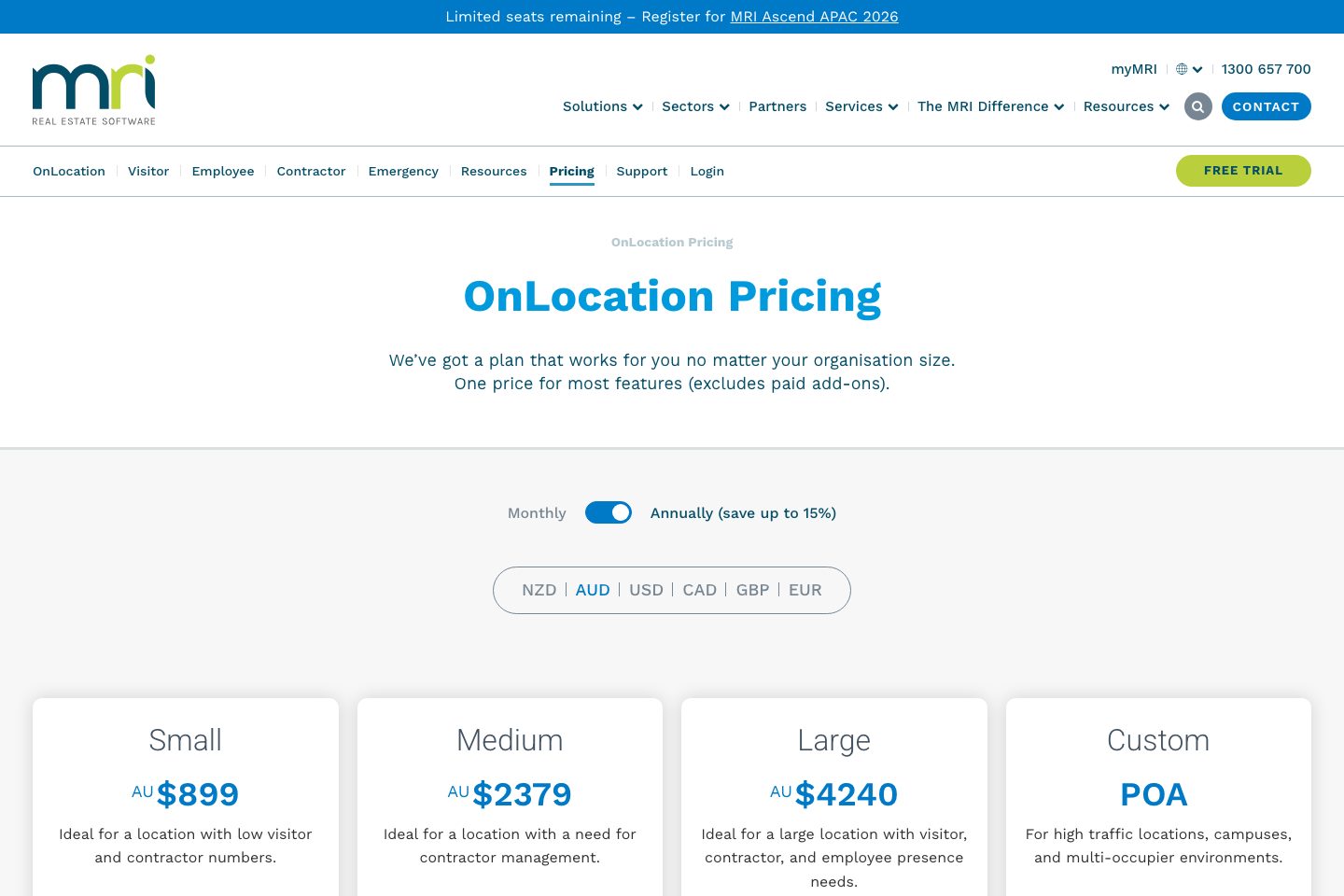
MRI publishes Small, Medium, Large, and Custom subscription plans in AUD, with usage limits for movements, notifications, and SMS. Paid add-ons include OnScan and Desk Booking. A 14-day free trial with full feature access and no credit card is available.
Best for
- Workplace and facilities teams needing visitor, employee, and contractor presence management
- Organisations requiring emergency roll-calls and evacuation visibility
- Businesses managing contractor inductions, certifications, insurance, and access permissions
- Multi-location workplaces, campuses, and high-traffic sites
- Workplace reception and visitor screening
Target industries
Key capabilities
Emergency headcounts
Account for visitors and contractors in emergencies using built-in headcount functionality.
Operational reporting
Provides real-time and historical visitor reporting, operational data, and post-emergency reports.
Reporting & operational data
Monitor and report on visitors and contractor movements; provides operational data and reporting for compliance and visibility.
SOS alerts
Employees and contractors can send mobile SOS alerts that include GPS location.
Access permissions & alerts
Grant specific location access permissions and receive SMS/email alerts for unapproved entry attempts.
Contractor document management
Store certifications and insurance documents against contractor or organisation profiles.
Access permissions
Assign location permissions, including temporary access, to contractors and organisations.
Expiry and renewal alerts
Send automated reminders when contractor documents are due for renewal.
Waivers & hazard acknowledgements
Require contractors to acknowledge hazards and sign waivers before gaining access.
Touchless visitor sign-in
Visitors can sign in and out using mobile, QR code, or standard and touchless kiosk options.
Touchless sign-in & QR
Supports touchless sign-in options including QR codes and kiosk workflows to minimise contact during check-in.
Hardware kiosk support
Supports kiosk deployments and printer hardware for on-site sign-in workflows.
Pricing
Small
For a location with low visitor and contractor numbers.
- 3,000 annual visitor and contractor sign-ins
- 30,000 annual employee sign-ins
- 250 monthly visitor and contractor sign-ins
- 2,500 monthly employee sign-ins
- 500 SMS per year
Medium
For a location with a need for contractor management.
- 10,000 annual visitor and contractor sign-ins
- 100,000 annual employee sign-ins
- 833 monthly visitor and contractor sign-ins
- 8,333 monthly employee sign-ins
- 1,000 SMS per year
Large
For a large location with visitor, contractor, and employee presence needs.
- 20,000 annual visitor and contractor sign-ins
- 200,000 annual employee sign-ins
- 1,666 monthly visitor and contractor sign-ins
- 16,666 monthly employee sign-ins
- 1,000 SMS per year
Custom
For high-traffic locations, campuses, and multi-occupier environments.
- Unlimited visitor and contractor sign-ins
- Unlimited employee sign-ins
- 2,000 SMS per year
- Unlimited email and push notifications
Comparison data
Published signals used in the Overall Score ranking.
- Free access
- Free trial
- Deployment complexity
- Guided setup
- Hardware requirement
- Optional kiosk
Customer review summary
What users like
- Helpful support
- Smooth visitor check-in
- Easy to use
- Useful reporting
- Strong security and compliance workflows
- Badge management, desk booking, and streamlined workflows
What users dislike
- Limited hardware flexibility
- Pricing concerns
- Reliability or performance issues
- Administrative interface and navigation can feel complex or hard to find
- Administrative interface can feel complex
- Administrative navigation could be clearer
Review sources
Deployment & integrations
- free-trial (free trial offered) — and
- Kiosk hardware and printers (hardware support options)
Security, compliance & support
- Controls visitor, employee, and contractor access permissions.
- Supports hazard acknowledgements, waivers, NDAs, inductions, certifications, and insurance documentation.
- Provides emergency headcounts, evacuation management, cleared-zone tracking, and first-responder information.
- Supports screening questions and workplace safety requirements.
- Provides real-time and historical reporting for compliance activities.
