
VizMan
vizman.app
- Last scraped (UTC)
- 19 Oct 2026
- Product analysis updated
- 1 Nov 2026
- Sources
- 15
- Evidence confidence
- High
Product media
Directory editorial analysis
What to know about VizMan
VizMan’s documented visitor process begins with a host invitation or pre-registration and continues with OTP or QR verification by a gatekeeper or receptionist. Hosts are notified by SMS, email, and in-app alerts when visitors check in; staff can then track visitor status and duration, assign access rights by visitor type, and use role-specific screens. The workflow also brings meeting scheduling, agendas and minutes, gate passes, courier or material logs, and visitor reporting into the same platform. Its product page describes an encrypted, centralized visitor database and exports for visit logs and meeting reports. The published use cases span offices, healthcare, education, factories, warehouses, government, events, and housing societies. The pages show free-access prompts but do not establish a plan price or whether access is a trial or ongoing free plan. Mobile compatibility with Android and iOS is stated in a customer testimonial.
- Best for
- Organizations digitizing visitor invitations, reception check-in, and host notifications
- Known strength
- Efficient visitor check-ins and tracking — A reviewer valued streamlined check-ins and visitor tracking for maintaining a secure visitor environment.
Strengths
- Efficient visitor check-ins and tracking — A reviewer valued streamlined check-ins and visitor tracking for maintaining a secure visitor environment.
- Real-time notifications — A reviewer highlighted notifications for timely awareness.
- Ease of use — A reviewer considered VizMan easy to use.
- Connects pre-registration, OTP or QR check-in, host alerts, and real-time visitor tracking in a documented workflow.
- Combines visitor records with meetings, gate passes, couriers, and material logging.
Fit considerations
- The documented core workflow relies on gatekeeper or receptionist verification, so buyers should assess how it fits their entry-point staffing model.
Questions to ask
- How will visitor-type access rights and role-based screens map to your reception and security responsibilities?
- Which visitor, meeting, and material records do you need to export for internal review?
- How will the listed free-access option and any paid offering fit your expected sites and usage?
- How well does VizMan match your busiest visitor, contractor, or reception workflow?
- Which locations, teams, and visitor types should be included in the first rollout?
Implementation notes
- Map host invitation, reception verification, notification, and reporting steps to the site's visitor process.
- Decide which roles need access to the receptionist, gatekeeper, and admin screens.
Scoring criteria
How VizMan scores
Scores follow an editorial model benchmarked against VisitUs, which has fixed category and overall scores. Other products are calculated from their captured data. Public scores are intended as comparison prompts alongside your own procurement needs.
Customer review sentiment
5. 0/5 from 1 published reviews across 1 source, with 30 stored feedback themes
18 point weighting · 1 review across review sourcesVisitor and contractor workflows
4 visitor, contractor, badge, host, delivery, identity, and QR workflow signals
10 point weighting · Published vendor and profile signalsEvacuation management
No evacuation management evidence captured
7 point weighting · Published vendor and profile signalsAdvanced reporting
3 reporting, analytics, audit, export, or visitor-history signals
7 point weighting · Published vendor and profile signalsPublished feature breadth
12 documented capabilities
10 point weighting · Published vendor and profile signalsMobile and kiosk flexibility
No public evidence captured yet
8 point weighting · Published vendor and profile signalsOngoing free access
Free access signal published
6 point weighting · Published vendor and profile signalsDeployment and integrations
0 published deployment and integration options
7 point weighting · Published vendor and profile signalsIndustry coverage
11 documented sectors
5 point weighting · Published vendor and profile signalsSource coverage
15 vendor pages analysed, 1 review source captured
5 point weighting · 15 source pages analysedVisitor management focus
80% fit against visitor-management-specific positioning signals
5 point weighting · Published vendor and profile signalsAccess-control integrations
1 access-control integration signal
5 point weighting · Published vendor and profile signalsRegional hosting and data residency
No public evidence captured yet
3 point weighting · Published vendor and profile signalsPricing transparency
Pricing page published
4 point weighting · Published vendor and profile signalsA lower score can mean the directory found less public evidence, not that a product cannot support the workflow. Use these criteria as shortlist prompts alongside your own procurement needs.
Overview
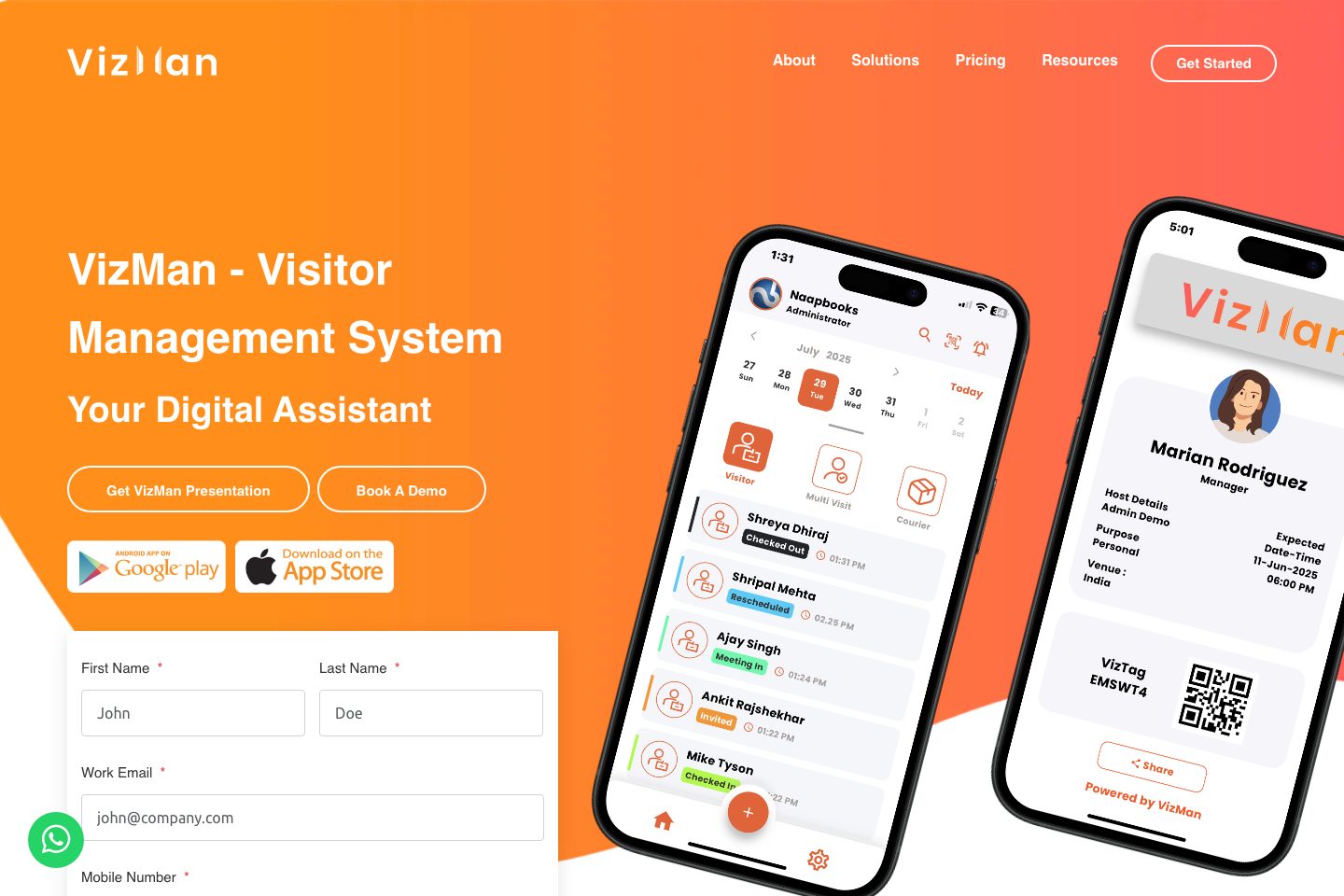
VizMan’s visitor workflow starts with host-created invitations or pre-registration, followed by OTP or QR verification at the gate. Receptionists and security staff can check visitors in, while hosts receive SMS, email, and in-app arrival notifications.
The system tracks visitor status and duration, supports visitor-type access rights and role-based screens, and records gate passes, couriers, and materials. Meeting tools cover scheduling, reminders, agendas, and minutes. Visitor logs and meeting reports can be exported for audits and trend analysis, with analytics for visitor activity.
The product page describes a centralized, encrypted database for visitor records. VizMan also presents event management and lists use cases including offices, healthcare, education, factories, warehouses, government offices, events, and societies.
Best for
- Workplaces replacing paper visitor registers with digital check-in
- Reception and security teams managing visitor arrivals
- Organizations that need host notifications and pre-registration
- Facilities tracking visitor status, duration, and visitor-type access
- Sites managing gate passes, couriers, or incoming and outgoing materials
Target industries
Key capabilities
Visitor database
Store visitor logs in a centralized database described as encrypted on the product page.
Reports and exports
Export visit logs and meeting reports for audits, compliance, and trend analysis.
Role-based screens and access rights
Use screens for receptionist, gatekeeper, and admin roles, and assign access rights by visitor type.
Gate passes
Generate gate-pass entries for visitors or materials.
Visitor analytics
View visitor trends and frequency.
Event management
Manage event invites, guests, attendance, attendee passes, and reports.
Visitor notifications
Hosts receive check-in alerts by SMS, email, and in-app notification.
Pre-registration and invitations
Hosts can invite or pre-register guests with meeting details and an OTP or QR code.
Visitor status and duration
Track visitor status and duration in real time.
Meeting management
Schedule meetings, send reminders, manage agendas, and capture minutes.
Courier and material logs
Record couriers and materials at reception.
Pricing and plan limits
- Product analysis updated
- 1 Nov 2026
- Pricing checked
- Not separately checked
- Evidence refreshed
- 1 Nov 2026
Pricing has not been separately verified. Confirm currency, billing term, hardware, SMS, onboarding, integrations and taxes.
Pricing is unknown for this product. Request a current commercial proposal.
The supplied pages include “Try for Free,” “Start for Free,” and “Get Free Access” calls to action, but do not show a price or specify whether access is an ongoing free plan or a trial.
Evidence behind the profile
Documented means a public source makes the claim; it does not mean an independent product test. Inferred claims need confirmation.
11 documented · 0 inferred · 0 unresolved claims
- Documented claim — Hosts can create invitations or pre-register visitors with meeting details and an OTP or QR code.
- Documented claim — Gatekeepers or receptionists verify arriving visitors with OTP or QR.
- Documented claim — Hosts receive visitor check-in notifications by SMS, email, and in-app alerts.
- Documented claim — The product supports real-time visitor status and duration tracking and visitor-type access rights.
- Documented claim — Meeting management includes scheduling, reminders, agendas, and minutes.
- Documented claim — Visit logs and meeting reports can be exported.
- Documented claim — The product page describes a centralized, encrypted database for visitor logs.
- Documented claim — A customer testimonial says the app is compatible with Android and iOS.
- Documented claim — Customer testimonials mention service and support, including issue resolution.
- Documented claim — The supplied pages show free-access calls to action but no public price or defined access term.
- Documented claim — The product page names offices, healthcare, factories, warehouses, schools, government, events, and societies as use cases.
Comparison data
Published signals used in the Overall Score ranking.
- Mobile apps
- iOS and Android
- Reporting
- Real-time visitor analytics and downloadable reports are described., Visit logs and meeting reports can be exported.
Customer review summary
Captured themes from the linked review sources; these are summaries, not verbatim quotations or a representative customer survey. Source totals may overlap. Editorial strengths and fit considerations are shown separately in our buyer analysis.
What users like
- Efficient visitor check-ins
- visitor tracking
- real-time notifications
- customizable features
- easy to use
- efficient visitor check-in
What users dislike
- the visible reviewer reported no meaningful dislikes
- no specific product disadvantage was identified by the visible reviewer
- no specific product weakness was reported
- the reviewer reported no specific dislikes
- the reviewer reported no notable dislikes
- No specific dislikes were reported by the visible reviewer
Review evidence last checked: 1 Nov 2026. Individual theme capture dates are not recorded.
Review sources
Security, compliance & support
- The visitor-management page describes a centralized, encrypted database for visitor logs.
- The product supports OTP and QR visitor check-in and describes visitor reports as useful for audits and compliance.
- Customer testimonials on the product page mention support and issue resolution.

