

1. Agree the approval boundaries and responsible people
Verify the receiving tenant before sharing visitor details, and require that tenant’s authorised approver to accept the visit. Keep permission to enter common areas separate from permission to visit a tenant.
This recommended multi tenant warehouse visitor management procedure assumes one shared gatehouse, independently operated warehouse tenants with separate hosts and approvers, and a site operator responsible for common areas. Have those parties approve the procedure locally; it is not a statement of universal legal duties or a claim about any product’s capabilities.
| Responsible role | Decision or action to own |
|---|---|
| Site operator | Approve common-area admission rules, safe waiting locations, emergency-accountability access and the fallback arrangement. Do not substitute for a tenant’s visit approval. |
| Gatehouse supervisor | Maintain shift coverage, oversee receiving-tenant checks, resolve routing exceptions and prevent movement while responsibility is unresolved. |
| Tenant approvers | Confirm their own tenant’s bookings, accept or decline visits, nominate deputies and maintain authorised host information. Never approve another tenant’s visitors. |
| System administrator | Implement tenant boundaries, notification routing and export restrictions; test permissions; maintain controlled correction and audit access. Administrative access is not visit-approval authority. |
Name a deputy for each role. If someone holds multiple roles, record which authority they use for each decision.
Under this procedure, common-area permission may allow waiting at the gatehouse without allowing tenant entry. Tenant acceptance does not override common-area restrictions. Neither decision authorises loading or contractor work. After routing is settled, use the separate driver handoff procedure or contractor induction and admission procedure.
2. Establish the authoritative tenant and approver directory
Recommended setup: establish one controlled routing directory, not one shared visitor log.
The site operator should confirm each tenant’s official operating name, recognised trading names, unit and approved reporting destination. Each tenant should nominate a directory owner who confirms its hosts, authorised approvers, deputies, coverage hours and verified contact routes. Distinguish a host who may receive notifications from an approver who may accept visits.
The administrator should assign a stable tenant identifier and associate accounts, approval permissions and notification destinations with that tenant. Record who authorised each directory change and when it took effect. Remove obsolete contacts and access when staff leave or tenants change; have the supervisor verify that the directory covers the current shift before relying on it.
OWASP recommends establishing tenant context early and checking that the authenticated user is authorised for the selected tenant. It explicitly warns that a tenant identifier is not itself an authorisation control. OWASP: Multi-Tenant Security, checked 13 November 2026
Apply that principle operationally: selecting a tenant name must not automatically give a visitor, host or gatehouse account access to that tenant’s records. Keep proposed destination, verified receiving tenant and accepted visit as distinct states. These are recommended workflow states, not assumed software features.
3. Restrict visibility before enabling arrival notifications
OWASP recommends least privilege, denial by default and permission checks on every request—not merely hiding unavailable actions on a screen. OWASP: Authorization, checked 13 November 2026
Recommended permission design: approve the following boundaries before entering real visitor information.
| Role or surface | Allow | Restrict |
|---|---|---|
| Gatehouse operator | Current arrivals, necessary routing details, verification evidence, approval status, destination and presence information across the entrance | Tenant business notes, unrestricted historical browsing and bulk exports |
| Gatehouse supervisor | Operational exceptions and controlled corrections needed for the shift | General access to tenant dossiers or permission to accept visits on a tenant’s behalf |
| Tenant host | Necessary details of verified visits assigned to that host | Other tenants’ hosts, visitors, history and approval actions |
| Tenant approver | Necessary verified visits within the approver’s tenant and delegated scope | Cross-tenant approval, search, lists and exports |
| System administrator | Configuration and specifically authorised troubleshooting or correction | Routine use of a privileged account for reception; unapproved bulk disclosure |
| Emergency-accountability role | The approved site-wide presence information needed for an incident | Routine tenant browsing under an emergency-access justification |
Configure and test every disclosure surface:
- Host search: gatehouse staff may use the controlled routing directory. Tenant accounts should search only their authorised host scope. Do not expose a site-wide staff directory on a public kiosk.
- Arrival notifications: hold detailed notifications until receiving-tenant verification. Check primary recipients, deputies, distribution-list membership, messaging channels and escalation routes.
- Visit lists: restrict current, historical, cancelled and corrected visits, including dashboard counts and search suggestions where they reveal other tenants’ activity.
- Exports: deny by default. If a tenant records role needs exports, permit only that tenant’s authorised records and fields. Check scheduled reports and download links too.
- Unattended kiosks: display no previous visitor details, visitor lists or staff contact details. Reset after completion, cancellation and inactivity. Route uncertain arrivals to assistance rather than exposing more directory information.
Have the administrator verify the underlying access checks as well as visible screens. Whether the installed system can enforce these boundaries is unknown until documented and tested.
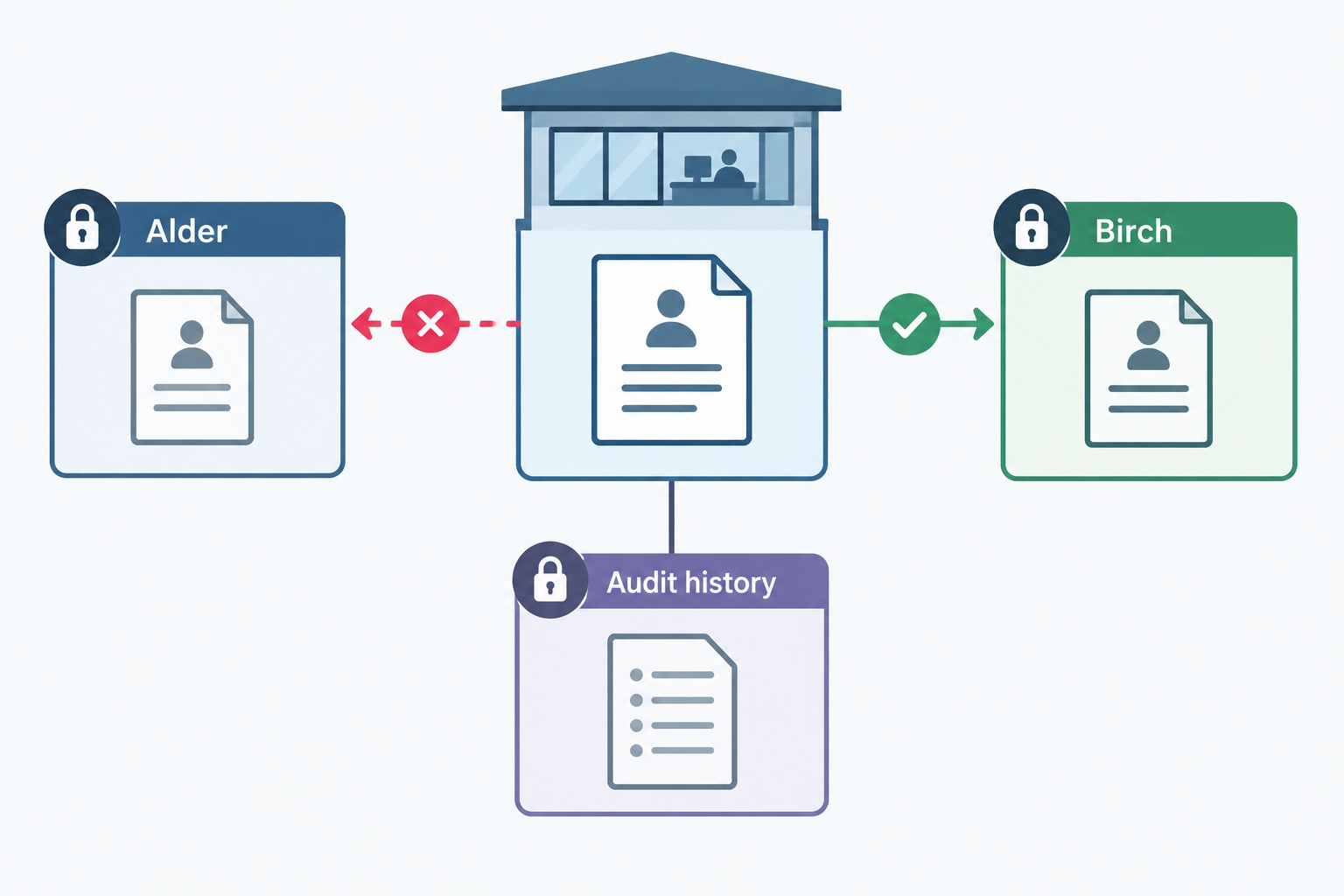
- Establish the destination Verify Recommended gatehouse step: confirm the receiving tenant using booking or directory-verified host evidence before releasing visitor details.
- Enforce the tenant boundary Scope OWASP recommends verifying that the authenticated user is authorised for the selected tenant; a tenant identifier alone is not access control.
- Keep decisions separate Approve Recommended gatehouse step: obtain that tenant’s acceptance and a separate common-area decision. Neither authorises loading or contractor work.
- Do not guess or broadcast Hold Recommended exception step: keep unresolved visitors in the approved safe waiting location while the supervisor establishes responsibility.
- Preserve the correction trail Correct Recommended correction step: confirm the correct tenant, invalidate the wrong approval, restrict the audit history and route actual exposure through the incident process.
- Prove denied access Test OWASP recommends validating designed permissions through tests. Exercise cross-tenant search, direct access, approvals, notifications and exports.
4. Verify the receiving tenant before releasing visitor details
Recommended arrival sequence: keep the visitor at the site-approved reporting or waiting location while establishing responsibility.
- Ask for the receiving business and purpose. Use the delivery or appointment reference, intended host or tenant unit to resolve the destination. Do not assign a tenant from the carrier name alone.
- Match proportionately. Check the booking reference and destination against the controlled booking or host record. Inspect only the necessary part of delivery paperwork; do not routinely copy the full manifest or identity document.
- Resolve ambiguity privately. Contact the relevant directory-verified tenant contact using the minimum booking or destination information necessary. Do not broadcast the visitor’s details to all tenants asking who recognises them.
- Record tenant verification. Record the receiving tenant, evidence used, checker, time and any remaining uncertainty. Keep an unresolved arrival restricted to authorised gatehouse staff.
- Release the scoped approval request. Only after tenant verification, share the necessary visitor details with that tenant’s authorised approver. Record explicit acceptance or refusal, the decision-maker, destination and conditions.
- Apply the separate common-area decision. Give movement instructions only when both relevant permissions are satisfied. A sent notification is not acceptance.
Great Britain’s HSE recommends agreeing arrival parking, reporting points, contact arrangements and safe delivery plans between the parties. Its guidance says unresolved significant safety issues should prevent the delivery or collection proceeding. HSE: Delivering safely, checked 13 November 2026
Apply that guidance here through the local traffic plan: identify a safe waiting location in advance, including what staff should do when it is unavailable. Do not improvise a waiting place in a vehicle operating area.
5. Resolve unknown tenants and unavailable approvers
Recommended decision tree: start with the receiving-tenant check and follow the applicable branch. An emergency takes priority under the site emergency plan.
| Decision | If yes | If no or unknown |
|---|---|---|
| Is the receiving tenant verified? | Check that the current record names that tenant. | Keep the arrival gatehouse-only. Ask for booking or host clarification and contact the directory-verified routing contact. Do not send a site-wide enquiry containing visitor details. |
| Does the assigned tenant match the verified tenant? | Seek that tenant’s authorised approval. | Stop routing and further notifications. Follow the correction procedure before continuing. |
| Is an authorised tenant approver available? | Obtain and record an explicit decision. | Contact that tenant’s nominated deputy, then its agreed escalation contact. A neighbouring tenant or the site operator cannot supply tenant approval unless separately and explicitly authorised for that role. |
| Has the tenant accepted, and is common-area movement permitted? | Give the approved destination, route and handoff instructions. | Keep movement pending or arrange a controlled departure or rescheduled visit. |
Throughout an unresolved branch, keep the visitor in the approved safe waiting location and assign the gatehouse supervisor responsibility for the next action. If the waiting arrangement becomes unsafe or unavailable, use the site-approved alternative or arrange departure; do not release the visitor into a tenant’s area to clear the queue.
Record the unresolved question, contact attempts, current location, decision owner and next review point. Carry these exceptions into the shift handover without marking them accepted or departed merely to close the screen.
6. Correct a wrong-tenant assignment without hiding the history
Recommended correction sequence: treat wrong-tenant assignment as both a routing problem and a possible disclosure incident.
- Stop the next action. Hold movement and further messages. Confirm the visitor’s safe location. Preserve actual presence status; correction is not sign-out.
- Confirm the correct tenant independently. Use the directory-verified contact and proportionate booking evidence. Obtain fresh acceptance from that tenant’s authorised approver before permitting the visit.
- Withdraw the incorrect authority. Cancel the wrong approval request and invalidate any incorrect approval or tenant access grant using supported methods. Withdraw queued notifications and attempt recall of delivered notifications where supported. Record unsupported or unsuccessful actions explicitly.
- Make an auditable correction. Record the original and corrected tenant, reason, evidence, operator, time, withdrawn decision and new approval. Restrict the cross-tenant correction history to authorised supervisors or incident staff. Do not expose it through either tenant’s routine visitor list.
- Verify the result. Check old links, approval actions, lists, exports and pending messages. If safe reassignment is unsupported, close the incorrect tenant task as invalid and create a correctly restricted visit linked through a supervisor-only correction record. Preserve one accurate account of the person’s presence.
- Handle exposure separately. Identify what information reached which recipients and when. Refer any actual exposure through the organisation’s incident process, involving the appropriate tenant contacts and privacy or security owner. Do not send the full correction history to everyone previously notified.
A recall must not be treated as erasing an earlier disclosure. Microsoft’s Exchange Online documentation describes recall attempts, outcome reports and limitations; it is not a guarantee that every notification channel can retrieve a message. Microsoft: Cloud-based message recall, checked 13 November 2026
Keep operational correction and incident closure separate. NIST’s incident-response guidance, published 3 April 2025, places preparation, detection, response and recovery within continuing risk management. NIST SP 800-61 Revision 3
7. Preserve site-wide emergency accountability
Recommended emergency arrangement: authorise a named site-wide accountability lead and deputy to obtain a consolidated presence roster under the emergency plan. Do not give every tenant routine access to that roster.
Limit the emergency view to information needed to identify people and reconcile their presence: visitor identity, tenant or unresolved destination, last known location, host contact, arrival or departure status and record freshness. Include people waiting in common areas whose tenant is still unknown. Keep commercial notes and booking attachments out of the emergency view.
Define who may activate or use this access, how its use is recorded, where a restricted fallback is held and who checks access after the incident. Rehearse it without depending on an unavailable administrator to grant permissions during an alarm.
Tenant staff should report their own visitor position through the agreed accountability channel. The authorised lead consolidates reports; routine tenant permissions remain unchanged. Use the separate warehouse evacuation roll-call procedure to reconcile records with physical reports.
This is an application of role-specific least privilege, not an exception that permits unrestricted browsing. OWASP recommends defining users, resources and permitted operations explicitly. OWASP: Authorization
8. Worked example: a driver incorrectly assigned to the neighbouring tenant
Fully fictional worked example: all businesses, people, references, times and technical outcomes below are invented. They illustrate a correction, not a real product’s capabilities.
A shared gatehouse serves Alder Components and Birch Packaging. At 09:10, driver Sam Vale arrives with carrier Westline. The operator assumes Westline is delivering to Alder, creates visit G-104 under Alder and sends an approval request containing Sam’s name, carrier and arrival time. Alder approver Mira accepts without checking the booking. Birch sees nothing.
Before releasing Sam from the approved waiting area, the supervisor checks reference BP-472. The delivery paperwork names Birch. At 09:14, Birch’s directory-listed contact, Leon, confirms that reference and the receiving destination. The supervisor records Birch as verified, shares the necessary visitor details with Leon and obtains Birch’s acceptance at 09:16. Common-area movement remains pending during correction.
The administrator invalidates Alder’s approval, disables its approval link and removes G-104 from Alder’s routine visit access. In this fictional configuration, a supervisor-only history retains the original assignment and correction. The earlier email cannot be recalled, so the supervisor records the exposure and opens incident I-18 rather than describing the mistake as erased.
| Viewer | Before correction | After correction |
|---|---|---|
| Gatehouse | Sam’s arrival, incorrect Alder assignment and Alder approval | Same arrival and presence record; Birch verified and accepted; Alder decision invalidated |
| Alder approver Mira | Incorrect request and visitor details in Alder’s list and email | No live visit access or valid approval action; previously received email remains an exposure handled under I-18 |
| Birch approver Leon | No access to G-104 | Necessary details of Birch’s accepted visit; no Alder visitor list or cross-tenant incident narrative |
| Authorised supervisor and incident handler | Original routing and notification events | Restricted correction history, affected recipient, failed recall and incident reference |
| Other tenant staff | No access unless specifically assigned | No access unless specifically assigned |
At 09:18, the supervisor verifies the corrected permissions and the site operator’s common-area permission. Sam receives the approved route to Birch’s reporting point. Loading permission remains a separate decision. Incident I-18 remains open even though routing is now resolved.
9. Verify the boundaries with synthetic visitor data
OWASP recommends testing that designed permissions are enforced and reviewing permissions after deployment. Its multi-tenant guidance also calls for negative-path tests of tenant isolation. OWASP: Authorization · OWASP: Multi-Tenant Security
Completed hypothetical acceptance run: the following results are invented, not a test report for any supplier. The administrator used isolated test accounts, synthetic visitors Jo Reed for Alder and Sam Vale for Birch, and test-only notification destinations. The gatehouse supervisor witnessed the run.
| Test performed | Expected result | Fictional observed result | Action on failure |
|---|---|---|---|
| Alder account searched for Sam by name and reference, then opened a known Birch visit link; reverse test used Birch and Jo | No cross-tenant visitor details, list entries or usable direct links | Pass: searches returned no matching records; direct access was denied in both directions | Block launch; correct the access boundary and repeat search, list and direct-link tests |
| Alder approver attempted to accept Birch’s visit through a known approval link | No approval possible; Birch status unchanged | Pass: action denied and Birch remained pending | Disable affected approval route; repair authorisation and retest both tenants |
| Sam’s verified Birch arrival triggered primary and deputy notifications | Only authorised Birch test recipients receive necessary details; no message before verification | Fail: an old shared escalation group received a copy. Group removed; repeat run passed | Stop notification rollout; inspect recipient membership and all escalation paths before retesting |
| Ordinary Alder host requested an export; authorised Alder records account exported visits | Host export denied; authorised export contains only Alder’s permitted records | Pass: host denied; records export contained Jo, not Sam | Disable export access and scheduled reports; check file contents and download permissions before retesting |
| G-104 was corrected from Alder to Birch after an incorrect test approval | Fresh Birch acceptance; Alder approval invalid; old links denied; correction preserved; no duplicate presence | Pass: all conditions met. Delivered test email remained and was recorded as a simulated exposure | Hold routing; use the restricted-record alternative until correction and downstream access are verified |
| Kiosk session was completed, abandoned and reopened; host search was exercised | No prior visitor details, site-wide host contacts or visitor lists | Pass: each new session started clean and uncertain arrivals offered assistance | Disable unattended use; provide staffed registration until retested |
| Emergency lead requested the consolidated roster; ordinary tenant accounts attempted the same | Lead sees both synthetic visitors and unresolved common-area arrivals; ordinary tenant accounts denied | Pass: approved roster available and access recorded; tenant attempts denied | Do not launch until emergency availability and routine restrictions both pass |
In this fictional run, launch stayed blocked after the notification failure and was authorised only after correction and a successful repeat. For your deployment, retain the configuration version, accounts and roles tested, witness, expected and actual outcomes, notification evidence, inspected exports and corrective actions. Mark anything not demonstrated unknown, not passed.
Repeat affected tests after changes to tenant membership, approvers, permissions, integrations, report schedules or reassignment behaviour.
10. Use restricted separate records—or delay deployment
Recommended fallback: if the shared system cannot enforce the required boundaries, do not compensate by asking tenants to ignore records they can still open.
Use separately restricted tenant records, each accessible only to its authorised tenant users and designated gatehouse personnel. Keep a minimal shared gatehouse index for authorised site staff—not a log shared with every tenant. Record only what is needed to coordinate arrival and presence: visit reference, necessary identifying details, verified tenant or unresolved status, location, approval status, responsible contact and departure confirmation. Keep detailed bookings, attachments and tenant notes in the separate records.
For manual operation, use individually controlled records rather than an open sign-in book. Keep tenant paperwork separately secured. Verify the tenant before sending a scoped approval request through its directory-confirmed contact route; record the response in the restricted record and only the necessary status in the gatehouse index.
Separating storage is not sufficient by itself. OWASP explains that separate databases still depend on isolated credentials, administrative paths and other controls, while shared storage requires enforceable tenant ownership and policies. OWASP: Multi-Tenant Security
Have the site operator and tenants approve the fallback’s access, custody, correction and emergency arrangements. Test it with the same scenarios as the digital workflow. If neither the system nor a controlled alternative can preserve tenant separation, delay deployment and hold or defer affected visits until suitable controls exist.
Conclusion
Make tenant verification the gate before disclosure and tenant acceptance the gate before onward routing. Launch only after searches, notifications, approvals, exports and corrections pass the agreed tests. Preserve restricted emergency accountability, and use separately controlled records—or delay deployment—when the shared system cannot enforce the boundaries.
Sources
Source pages checked 13 November 2026.
Pricing and plan details can change; verify current terms with the vendor.