
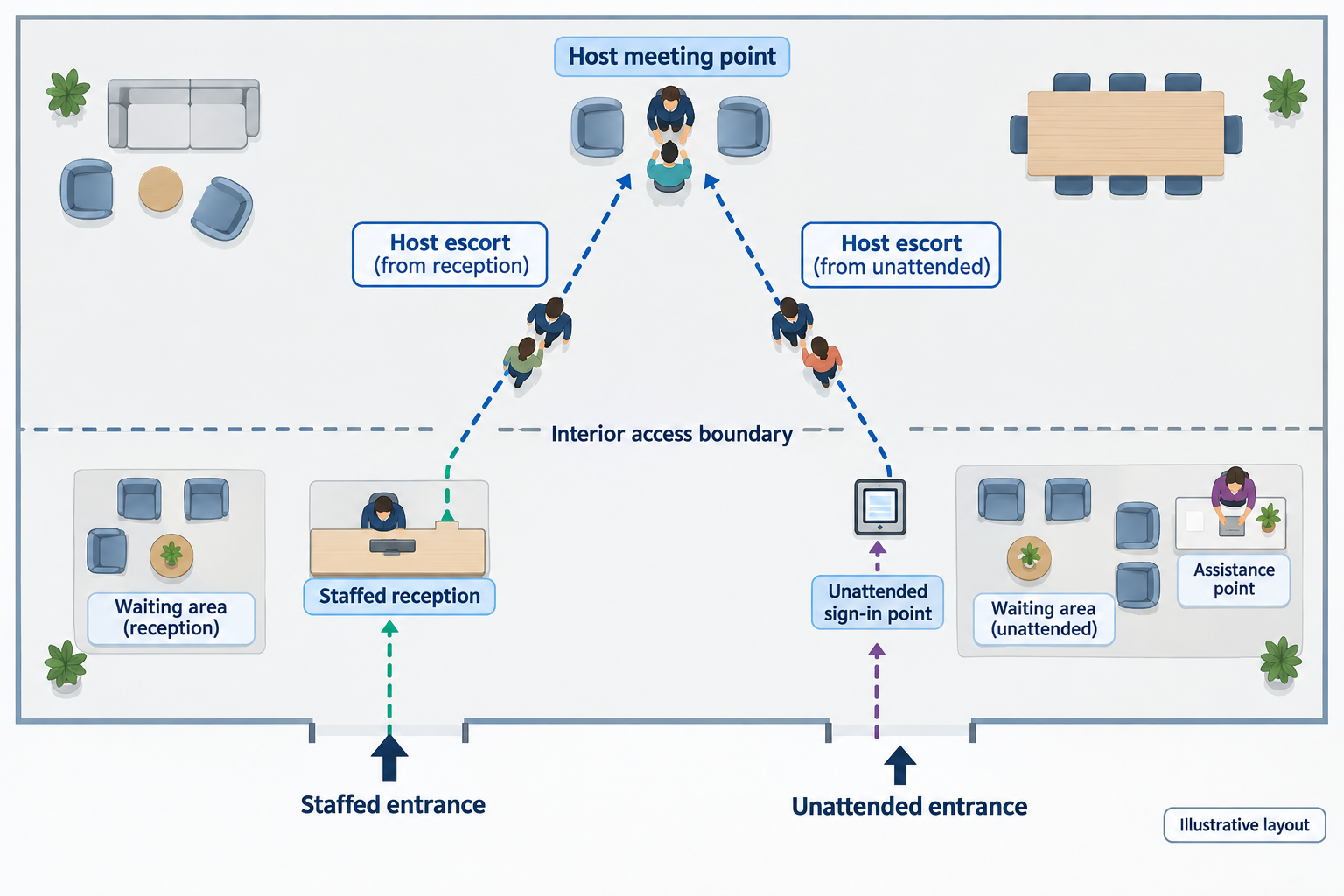
Assign ownership before installing the sign-in point
Start visitor management for offices by deciding who takes responsibility for a guest at each step—not by choosing a kiosk. Use the workflow below as a recommended operating model, then adapt it to your entrance layout, staffing hours and approval policy.
Before configuration, complete an entrance register:
| Decision | What to record |
|---|---|
| Entrance coverage | Staffed hours, unattended hours, permitted visitor types and alternative arrival point |
| Arrival assistance | A named duty role, contact method and backup for each operating period |
| Approval | Who may accept an unexpected guest or resolve a failed requirement |
| Access handoff | Who authorizes entry, provides an escort or issues a temporary credential |
| Departure | Who confirms departure and checks outstanding credentials |
| Exceptions | Who owns the case until it is resolved, redirected or cancelled |
Make facilities accountable for the overall process. Assign IT the device, network and directory tasks; assign the building access administrator the credential configuration; and give hosts explicit responsibility for collection and departure confirmation. At a shared building, agree the handoff with building reception rather than assuming tenant sign-in completes the building's arrival process.
Recommended launch rule: do not operate an unattended visitor entrance without a reachable duty contact and a tested alternative when that contact is unavailable.
Build the arrival journey for staffed and unattended entrances
Before arrival: give the visitor a complete route
Envoy's invitation documentation describes pre-registration and invitation details including the host, visitor, visit time and location; it also recommends arrival information such as directions and parking instructions. Custom email templates are plan-dependent. Envoy: registration with invites
For your office, prepare an invitation containing the correct entrance, arrival window, host, assistance contact, any required preparation and the departure procedure. Ask hosts to nominate a backup before inviting someone during unattended hours. Treat a completed pre-registration form as preparation for arrival, not your operational permission to enter.
At a staffed entrance
Have reception locate the expected visit or start the walk-in procedure, complete your required checks, notify the host and tell the guest where to wait. Keep unresolved arrivals with reception until an authorized person accepts responsibility.
At an unattended entrance
Lobbytrack documents self-registration on a lobby tablet or a visitor's phone, with optional photo capture and badge printing through a connected local Wi-Fi printer. Those capabilities describe registration, not a complete unattended operating procedure. Lobbytrack: self sign-in
Recommended arrival instructions should answer:
- Where should I sign in?
- What should I do if I have no invitation or cannot find my host?
- Where should I wait after submitting the form?
- How do I reach a person without using my own smartphone?
- What should I do if the device does not work?
Provide an assisted route for someone unable to use the screen, phone or language offered. Test the sign-in position and assistance method with users rather than assuming the kiosk placement works for everyone.
Suggested completion message: “Your arrival has been recorded. Please wait here for your host. If you need help, use the assistance contact shown below.” Use this wording only when it accurately reflects the configured workflow.
Use the practical visitor-management decision guide to map the whole visit before deciding which arrival steps to automate.
Make host absence an owned exception
Envoy's host notifications rely on a selected host and contact information in the employee directory. Its documentation also allows an additional email recipient to receive copies of sign-in notifications. Envoy: host notifications
Before the pilot, check host names, contact details, duplicate directory entries and notification preferences. Give the duty contact a way to see arrivals requiring attention, but do not treat copying a shared mailbox as assignment of responsibility.
Envoy describes escalation for an unresponsive host separately from fallback notifications when no host is selected. Its feature page does not establish the exact escalation timing or eligibility for your proposed configuration; confirm and demonstrate those details. Envoy: visitor notification system
Recommended exception procedure:
| Situation | Initial owner | Required decision |
|---|---|---|
| Host responds | Host | Confirm collection and meet the visitor |
| Host is absent or does not respond | Duty contact | Contact the backup and keep the visitor informed |
| No host selected or unexpected visitor | Reception or duty contact | Identify an authorized sponsor before proceeding |
| Required check cannot be completed | Designated approver | Resolve, redirect or decline under office policy |
| Nobody can accept the visitor | Duty contact | Arrange a staffed alternative or reschedule |
Hypothetical timing example—not a vendor default: contact the backup after three minutes without acknowledgment. At five minutes, the duty contact speaks with the visitor and offers an alternative or rescheduling. Adjust these thresholds to your staffing model and test them during the pilot.
Record the exception, the person accepting ownership, the decision and the resolution time in an approved record. Keep the case open until the handoff is actually complete.
- Prepare the arrival Host → visitor Recommended action: send the entrance, arrival window and assistance route. Evidence example: Envoy invitations include host, visitor, time and location details. Registration documentation
- Resolve the host handoff Visitor → host or duty contact Recommended action: confirm who will collect the visitor. Envoy documents host escalation and separate fallback notifications when no host is selected; verify your configuration. Notification features
- Confirm the access route Approver → escort or access administrator Recommended action: make entry authorization a distinct decision. Envoy's Brivo integration uses configured groups, credentials and access duration; do not infer access from sign-in alone. Brivo integration
- Close the visit Host → visit administrator Recommended action: confirm departure and separately check the credential outcome. Envoy supports reminders prompting hosts to sign visitors out. Sign-out reminders
- Use the outage branch Failure at any stage → duty contact Recommended action: activate the approved fallback or redirect to a staffed entrance. Envoy's supported offline mode queues entries but does not send host notifications, and has configuration restrictions. Offline limitations
Separate sign-in from the building access decision
Do not configure your operating procedure around the assumption that a completed form, printed badge or notification automatically grants building access.
For a concrete integration example, Envoy's Brivo documentation requires administrative permissions, an Envoy-specific Brivo API key and a visitor email field. Visitor access depends on configuration such as visitor-type mappings, Brivo groups, credential type and access duration. The documentation also warns that an additional Brivo purchase may be necessary. Envoy: Brivo integration
Similarly, Envoy documents that its visitor-log entry status defaults to “Approved” unless a required sign-in field has a rule configured. Do not use that default label as your evidence that a person has reviewed and authorized the visit. Envoy: visitor log
Use a separate access handoff checklist:
- Confirm the visit has met your approval requirements.
- Name the person responsible for accepting the visitor.
- Specify the destination, escort requirement and permitted duration.
- If issuing a credential, confirm the intended access group and expiry with the access administrator.
- Test a permitted door and a restricted door using an authorized test procedure.
- Test cancellation, early departure and expiry separately; do not assume one event handles the others.
For an escort-only pilot, keep credential automation out of scope and document who meets the guest. For an integrated pilot, require joint sign-off from facilities and the access administrator.
Close the visit with a departure check
Envoy supports host sign-out reminders by visitor type, delivered through email, mobile push or both. Its documentation describes a host action to sign out the visitor; mobile push requires the host's app and notifications to be enabled. Envoy: host sign-out reminders
Recommended departure procedure:
- Tell the visitor at arrival how to sign out and where to return any temporary credential.
- Ask the host to confirm departure if the visitor does not complete sign-out.
- Have the responsible administrator verify credential return or the configured access-removal outcome separately.
- Review unresolved visitor entries at the end of the operating period.
- Record uncertainty rather than inventing a departure time; investigate with the host or duty contact.
Envoy's visitor log exposes sign-in and sign-out times, notification status and a view of visitors currently signed in. Envoy: visitor log
Use those records as a reconciliation worklist. For emergency planning, agree with the workplace emergency lead how visitor records, host knowledge and outage records will be used together. Do not make routine sign-out cleanup a substitute for the site's emergency procedure.
Write the outage runbook before you need it
Envoy's offline documentation illustrates why fallback needs configuration-specific testing. Where offline mode is supported, entries are stored on the iPad and uploaded after reconnection. While offline, host notifications are not sent, pre-registration details do not automatically appear and badge printing may be affected. Envoy also states that offline mode will not work with security features or integrations enabled, naming restrictions including block lists, ID scanning, required pre-registration and conditional rules. Envoy: offline mode
Do not disable required checks merely to make offline sign-in available. Agree this fallback runbook before launch:
| Failure | Recommended operating response | Owner |
|---|---|---|
| Network or sign-in service unavailable | Activate the approved manual process or redirect visitors to a staffed entrance | Duty contact |
| Kiosk loses power or fails | Display assistance instructions and stop directing visitors to the failed device | Facilities |
| Host notification fails | Contact the host or backup through a tested alternative channel | Reception or duty contact |
| Printer fails | Use the approved temporary identification process, or pause admission if no alternative is approved | Duty contact |
| Access integration fails | Refer to the access administrator; do not improvise a door bypass | Access administrator |
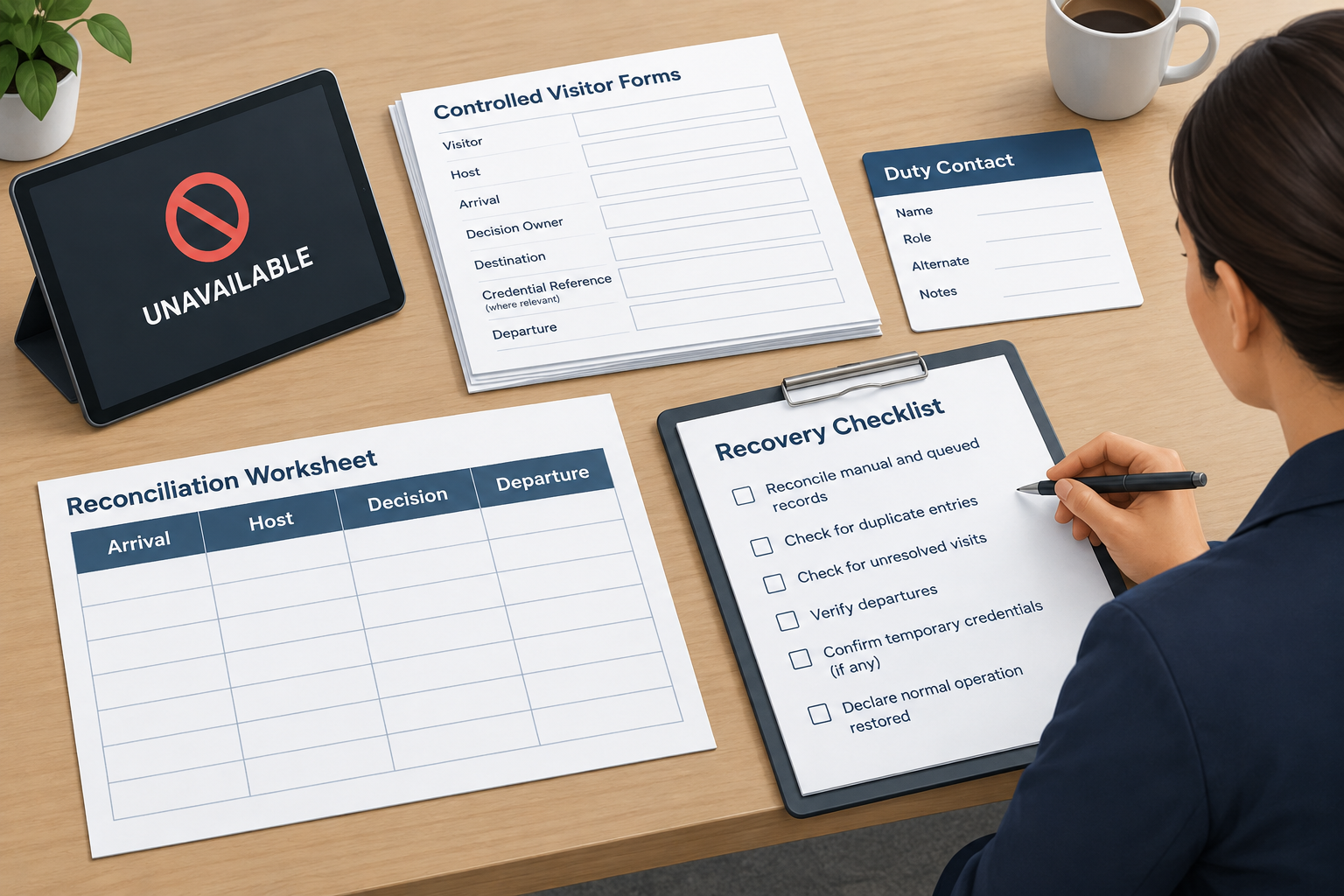
| Service returns | Reconcile manual and queued records, departures and any temporary credentials | Facilities with IT |
Prepare controlled fallback forms with only the fields your office has approved: visitor, host, arrival, decision owner, destination, credential reference where relevant and departure. Keep completed forms away from public view and define their transfer and disposal process.
For an unattended entrance, arrange either temporary staff coverage or redirection during failure. After restoration, check for duplicate entries and unresolved visits before declaring normal operation restored.
For a worked fallback and reconciliation checklist, consult the warehouse network-outage guide and adapt its record-handling steps to your office-approved procedure.
Pilot the complete handoff, then roll out entrance by entrance
Use the visitor-management buyer scorecard for vendor selection, then require shortlisted systems to demonstrate your actual office journeys. Treat unknown capability, pricing or plan eligibility as an open procurement question—not as included functionality.
Hardware is one detail to verify early: Envoy documents an iPad requirement for Visitors and supported printer and badge requirements when printing badges. Do not purchase devices before checking the selected product's compatibility. Envoy: supported hardware
Recommended pilot sequence
Prepare: map the entrances, approve the fields, populate the directory, name duty contacts and backups, document access boundaries, and prepare the outage kit. Assign an internal owner to approve permissions, retention, deletion and visitor-facing privacy information; do not assume a vendor's marketing statement answers those office-specific decisions.
Rehearse: use fictional visitor records for expected guests, walk-ins, absent hosts, declined visits and failures. Observe the unattended journey without leaving the test visitor unsupported.
Run a bounded live pilot: start at a staffed entrance, then test a supervised unattended period. A hypothetical schedule is one preparation week followed by two live-pilot weeks; extend it if important scenarios have not occurred or been rehearsed.
| Test | Recommended pass condition |
|---|---|
| Pre-registered guest | Correct entrance instructions, visit found and host collection completed |
| Unattended arrival | Visitor can finish or request assistance and knows where to wait |
| Missing or absent host | Named backup or duty contact resolves the case |
| Visitor unable to use self-service | Assisted route completes the same required decisions |
| Access handoff | Correct escort or credential; restricted-area test behaves as intended |
| Departure | Departure confirmed and temporary credential outcome checked |
| Network and device failure | Approved fallback works without bypassing required checks |
| Restoration | Manual and queued records reconciled without unresolved duplicates |
For each test, record arrival-to-collection time, assistance required, failed notifications, unresolved departures and the person responsible for corrective action. Separate form-completion time from the guest's total wait.
Rollout gate
Recommended release criteria are: every scripted case has a documented outcome, every exception has an owner, required controls have no unresolved failures, and local staff can perform the fallback without the project team.
Roll out entrance by entrance. Keep a local sign-off sheet covering configuration, contact rota, signage, devices, access tests, host training and rollback instructions. Review the first operating period at each entrance before expanding further.
Use a transparent first-year total-cost worksheet
Hypothetical worksheet only. Every amount below is an invented planning assumption in USD, not a vendor price, quote or market benchmark. The example covers one office with two sign-in points, one printer and 2,400 visits annually. It assumes a single software allowance covers the office; actual licensing scope is unknown until quoted.
| Cost item | Hypothetical calculation | Period | Example total |
|---|---|---|---|
| Sign-in tablets | 2 × $500 | One-time | $1,000 |
| Stands | 2 × $150 | One-time | $300 |
| Printer | 1 × $300 | One-time | $300 |
| Configuration and testing labor | 20 hours × $40 | One-time | $800 |
| Host and duty-team training labor | 10 hours × $40 | One-time | $400 |
| Signage and fallback kit | Allowance | One-time | $100 |
| Software | $200 × 12 months | Annual | $2,400 |
| Badge consumables | 2,400 × $0.25 | Annual | $600 |
| Administration and exception labor | 4 hours × 12 months × $40 | Annual | $1,920 |
| Integration or API allowance | Placeholder pending quote | Annual | $600 |
| Support and device-management allowance | $20 × 12 months | Annual | $240 |
Example arithmetic: one-time costs of $2,900 + annual costs of $5,760 = $8,660 for the first year. Adding a hypothetical $500 contingency reserve produces a $9,160 first-year planning total.
The total includes internal labor, not just supplier invoices. The recurring example assumes existing staff provide reception coverage; it does not include additional reception staffing, building access hardware, cabling, taxes, shipping, replacement devices or renewal increases. These are unresolved cost inputs, not assumed free items. Add them where applicable before approving a budget.
Replace each allowance with a quote or a measured pilot input. Confirm whether subscriptions, notifications, integrations, support and additional kiosks are included or separately charged. Avoid counting support or integration fees twice if bundled.
Hypothetical sensitivity check: if administration and exceptions take eight rather than four hours monthly at the same assumed labor rate, annual cost increases by $1,920, making the first-year planning total $11,080. Use the pilot's actual operating effort to revise this line before expanding.
Conclusion
Launch when the visitor handoffs work—not simply when the kiosk works. Require a reachable exception owner, a separate access decision, a departure check and a rehearsed fallback at every entrance. Expand only after the pilot demonstrates those steps, and replace hypothetical costs with quotes and measured operating effort.
Sources
Source pages checked 21 September 2026.
Pricing and plan details can change; verify current terms with the vendor.