
Can an AI assistant open the trial for you?
This review did not establish that an external AI agent could permissibly complete signup for any reviewed listing. That does not mean signup is impossible or that every vendor prohibits AI assistance.
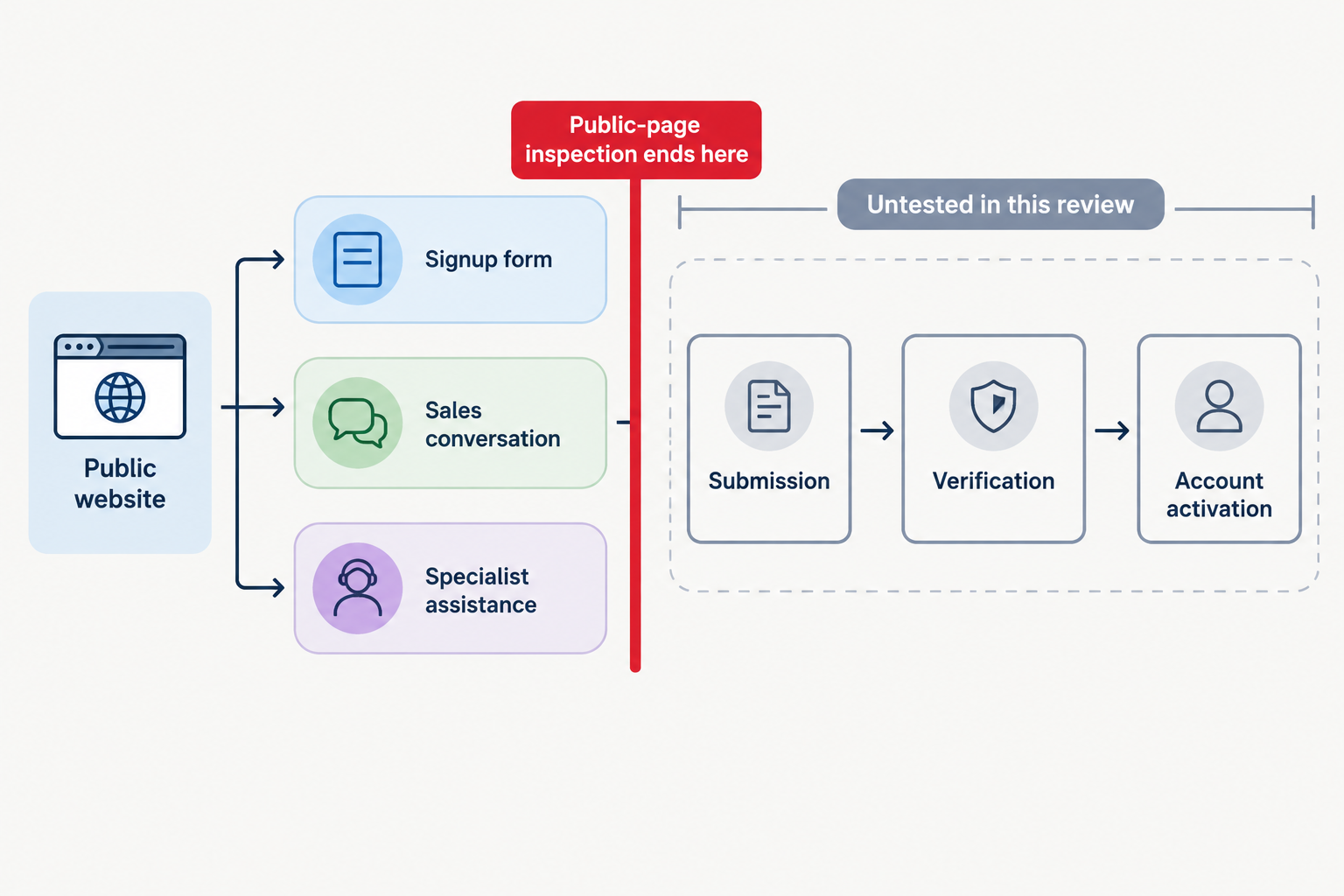
The public-page audit found 12 advertised or visible self-service signup/trial entry points, seven sales/contact/quote routes and one specialist-assisted trial. Explicit external AI account-creation permission was not established for any listing. Technical completion remains untested. Research log, 20 October 2026
For facilities and procurement teams considering AI signup for visitor management software, three questions must stay separate: can the assistant find and read the entry route, is the proposed automation permitted, and can registration reach a usable account?
This review examined the first question and available policy wording. No forms were submitted, accounts created, verification completed, trial accounts used or CAPTCHA bypassed. Inspection scope
Our recommendation is to treat an assistant as a proposed delegate of a named, authorised business user—not as an independent legal account owner. Confirm the permitted actions before attempting registration.
What the review did—and did not—test
The directory’s first-party observational review was dated 20 October 2026, Australia/Sydney. Its fixed sample comprised the first 20 records in the saved default API order, including featured placement. The table preserves that sample and order; it does not substitute today’s potentially changed API order. This is not an independent market ranking. Method and observations
Inspection covered public websites, signup links and available policies, with selected JavaScript pages inspected using Playwright. It stopped before submission. The findings therefore describe public entry routes, not vendor-confirmed automation permission or account-activation outcomes.
These are 20 listings, not 20 independent platforms. SwipedOn and The Receptionist direct new trials to Sign In App; Sign In Solutions announces a transition to Sign In App. Brivo’s visitor product is described as powered by Envoy. Those relationships are recorded in the research log, and the SwipedOn trial destination identifies Sign In App directly.
Use the audit to prepare supplier questions, not to score product quality. For a separate product-fit exercise, consult the visitor-management buyer’s shortlist.
The complete 20-listing signup-route audit
Self-service entry means an advertised or visible signup/trial entry point—not a completed registration or fully inspected form. Sales/contact describes the route inspected, not proof that no alternative exists. All observations below come from the dated research log. Listing links identify its recorded destinations.
| Listing, in saved order | Observed route | Observation or limitation |
|---|---|---|
| 1. VisitUs | Self-service entry | Email-first flow; AU, US or EU hosting choices. |
| 2. SwipedOn | Self-service entry | Sign In App destination; business details, region, consent and reCAPTCHA notice. |
| 3. Lobbytrack | Self-service entry | Signup page states email-code verification. |
| 4. Sine by Honeywell | Self-service entry | Trial advertised; application did not render in this run. |
| 5. The Receptionist | Self-service entry | Sign In App form rendered in browser; reCAPTCHA notice. |
| 6. Envoy | Self-service entry | Company-account form readable. |
| 7. Vizito | Self-service entry | Email, Google or Microsoft trial entry points. |
| 8. Joan Workplace | Self-service entry | Signup form available; applicable policy scope needs clarification. |
| 9. Eptura | Sales/contact | Proxyclick route presents Eptura Visitor and a demo. |
| 10. Vizitor | Self-service entry | Free-account form readable; business details, password and consent. |
| 11. Kisi Visitor Management | Sales/contact | Trial advertised; inspected route leads to a quote. |
| 12. OneTap | Self-service entry | Free-account link found; fields and current embedded terms unverified. |
| 13. Sign In Solutions | Sales/contact | Contact route; transition to Sign In App announced. |
| 14. Brivo Visitor Management | Sales/contact | Demo route; visitor product described as powered by Envoy. |
| 15. Teamgo | Self-service entry | Trial advertised; application fields unverified. |
| 16. Nibol | Sales/contact | Demo and personalised quote; full service terms not obtained. |
| 17. MyLobby | Specialist-assisted trial | Survey precedes account-specialist setup. |
| 18. FacilityOS | Sales/contact | Demo request; complete subscription agreement not obtained. |
| 19. EVA Check-in | Self-service entry | Signup link found; direct requests returned HTTP 403; fields unverified. |
| 20. VersionX Visitor Management | Sales/contact | Business-details contact form; full service contract not obtained. |
MyLobby’s trial page explicitly describes a survey followed by account-specialist setup. That is why assisted setup remains separate from self-service registration: a ‘trial’ label does not establish who creates the account.
Access duration is another separate question. Use the free-plan and trial guide when deciding whether your evaluation needs ongoing free access or a time-limited trial.
- Self-service entry
- 12 listings Advertised or visible signup/trial entry points—not completed registrations.
- Sales/contact
- 7 listings The inspected route led to a demo, contact or quote request.
- Specialist-assisted trial
- 1 listing MyLobby described account-specialist setup after a survey.
- External AI signup permission
- Not established Explicit external AI account-creation permission was not established for any listing. This is not proof of a ban.
- End-to-end completion
- Untested No forms submitted, accounts created, verification completed, trial accounts used or CAPTCHA bypassed. These are 20 listings, not 20 independent platforms.
A readable form is not permission or an activated account
The audit supports different answers at different stages. Research scope and results
| Question | What was established? | What remains unresolved? |
|---|---|---|
| Is there a public entry route? | A route was recorded for every listing. | Alternatives outside this inspection. |
| Is the form readable? | Some forms rendered; others remained unverified. | Complete field and interaction requirements across all listings. |
| May an external AI create the account? | No explicit permission established. | Vendor-approved scope for delegated assistance. |
| Can registration and activation finish? | No end-to-end attempts made. | Submission, verification, activation and usable trial access. |
A reCAPTCHA disclosure on a Sign In App route is not evidence that an agent was challenged or blocked. No challenge was completed. Likewise, Sine’s rendering failure and EVA Check-in’s HTTP 403 responses describe this inspection environment, not universal vendor AI-blocking policies. Recorded limitations
Recommended reporting rule: record ‘entry link located’, ‘fields inspected’, ‘permission confirmed’ and ‘activation observed’ separately, and only when supported. A readable form is not a successful signup; an inaccessible page is not a prohibition. Equally, written permission would not prove that an assistant can complete every technical step.
What the vendor policies actually help you decide
These examples reflect vendor pages checked on 20 October 2026, retaining stated policy dates where available. They identify questions to resolve, not legal conclusions about a proposed deployment. Reconfirm the applicable terms before acting.
Automated access: Joan and Eptura
Joan’s general Terms of Use expressly restrict automated access and give conflicting product-specific terms precedence. Its business terms, version 27 March 2026, address authorised company representatives, accurate registration and account responsibility without expressly granting external AI signup permission. Ask which terms govern the intended route. Neither ignoring the restriction nor declaring an unconditional blanket AI ban captures that nuance.
Eptura’s Acceptable Use Policy restricts automated gathering of service content and specified third-party AI activities. Those provisions do not expressly authorise automated account creation. Ask about the proposed interaction rather than treating a content-scraping restriction as a complete answer about signup.
Account identity and delegation: Lobbytrack, Sine and Teamgo
Lobbytrack’s terms, updated 8 September 2026, require accurate registration and password protection. The review’s policy observation also records a prohibition on registering for another individual. Ask Lobbytrack to distinguish approved assistance from registration on somebody else’s behalf; the restriction is material even though AI assistance is not separately addressed.
Sine’s displayed legacy wording requires a natural-person user and authority when representing a company. However, its terms landing page directs Sine Core licences purchased after 29 January 2025 and all free Sine User accounts to Honeywell modular terms. The legacy text remains relevant to specified earlier multi-year contracts. Those modular terms were not fully reviewed here, so legacy wording cannot settle a new signup.
Teamgo’s terms, updated 22 October 2025, define an End User as a registered natural person and require authority to bind the company. Neither Teamgo’s definition nor Sine’s natural-person wording alone settles whether an authorised human may use AI assistance. Clarify delegation while preserving the actual business and human account identities.
AI policies with a different purpose: VisitUs and Envoy
VisitUs’s AI Usage Policy, effective 3 July 2025, permits specified crawling and reuse of public website content. It does not expressly permit account creation. Envoy’s AI terms, updated 13 May 2026, govern Envoy-provided AI features—not an outside assistant opening a customer account. Neither policy answers the external-signup question.
Unknown must remain unknown: OneTap and incomplete contracts
OneTap’s old PDF URL redirected to a page with embedded terms whose current body was not verified. Older indexed automated-access wording was therefore excluded from the verdict. Complete service agreements were also not obtained for several sales-led listings. Missing or outdated text is not evidence of permission or prohibition. Policy gaps
Confirm delegation before attempting signup
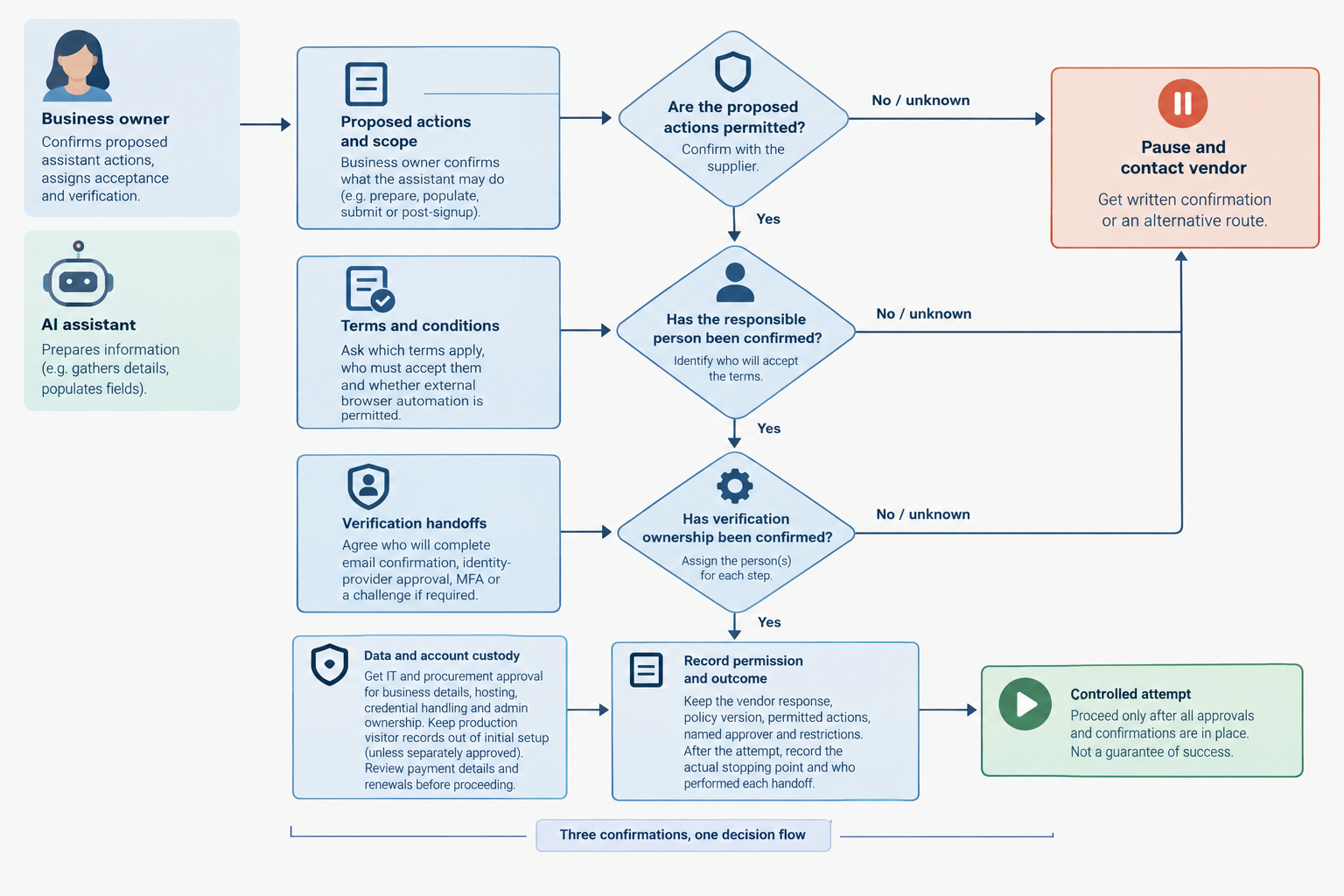
Recommended workflow—not a statement of vendor permission or legal requirements: apply the same confirmation process to every shortlisted supplier.
- Name the business owner and proposed delegate. Identify the organisation, authorised employee and assistant being considered. Explain whether the assistant would prepare information, populate fields, submit a request or interact after account creation. Do not present the AI as the customer in its own right.
- Ask about the exact route and actions. Send the signup URL and proposed scope. Request written confirmation of whether external browser automation is permitted, which terms apply and who must accept them. For sales-led or assisted routes, ask whether the supplier should provision the trial instead. Permission to prepare details should not be stretched into permission to submit them.
- Agree verification handoffs. Ask who must complete email confirmation, identity-provider approval, MFA or a challenge if encountered. Establish a stop-and-handoff rule rather than attempting to bypass controls. Do not assume the assistant is authorised to access an employee’s inbox or approve an identity-provider consent request.
- Approve data and account custody. Have IT and procurement approve the business details to disclose, hosting selection, credential handling and administrator ownership. Keep production visitor records out of initial setup unless separately approved. Review payment details and renewal commitments before authorising any action involving them.
- Record permission and outcome separately. Retain the vendor response, relevant policy version, permitted actions, named approver and restrictions. Following an authorised attempt, record the actual stopping point and who performed each handoff—not merely that the assistant reported success.
If permission remains unresolved, limit the assistant to approved preparation and let the authorised employee or vendor complete registration. Ask for a supported alternative rather than repeatedly trying different routes.
Completed hypothetical example: a fictional facilities team asked Supplier Cedar whether its assistant could submit a trial request. Cedar permitted preparation only and required an employee to submit and verify. The employee completed those steps. The team recorded ‘human-created trial with AI preparation’, not ‘autonomous AI signup’. This illustrates accurate reporting; it is not a result from any reviewed vendor.
Treat signup as preparation, not the product evaluation
After an approved account-opening process, evaluate the reception workflow separately. Our recommendation is to test the same arrivals, host handoffs, exceptions and departures for each shortlisted product, using the intended configuration and fictional visitor data.
Use the practical visitor-management comparison scorecard to organise that assessment. Keep ease of account opening separate from operational suitability: your decision should address required workflows, acceptable data handling, support and the complete commercial scope—not simply whether an assistant could reach a signup page.
A sales-assisted route is not automatically a product weakness, just as a readable self-service form is not proof of a suitable deployment. Choose the evaluation route that your organisation and the supplier can explicitly support.
Conclusion
A visible signup route is neither permission to automate registration nor proof that activation will succeed. Confirm the vendor’s position, keep a named human responsible for acceptance and verification, and report route discovery, permission and completion separately. Where permission remains unclear, choose human-led or vendor-assisted setup.
Sources
Source pages checked 19 October 2026.
Pricing and plan details can change; verify current terms with the vendor.
- 20 October 2026 public-page signup researchThis review recorded 12 advertised or visible self-service signup/trial entry points, seven sales/contact/quote routes and one specialist-assisted trial across 20 directory listings.
- Research log, 20 October 2026
- SwipedOn trial destination
- MyLobby
- general Terms of Use
- business terms, version 27 March 2026
- Acceptable Use Policy
- terms, updated 8 September 2026
- terms landing page
- terms, updated 22 October 2025
- AI Usage Policy, effective 3 July 2025
- AI terms, updated 13 May 2026